

























Rippling and its affiliates do not provide tax, accounting, or legal advice. This material has been prepared for informational purposes only, and is not intended to provide or be relied on for tax, accounting, or legal advice. You should consult your own tax, accounting, and legal advisors before engaging in any related activities or transactions.
The Rippling Rundown — January '26 Release

A strong year starts with strong systems. These updates add more structure to your learning systems, simplify employee departures, make travel booking a breeze, and expand payroll coverage, helping you run a more globally organized business.
Featured
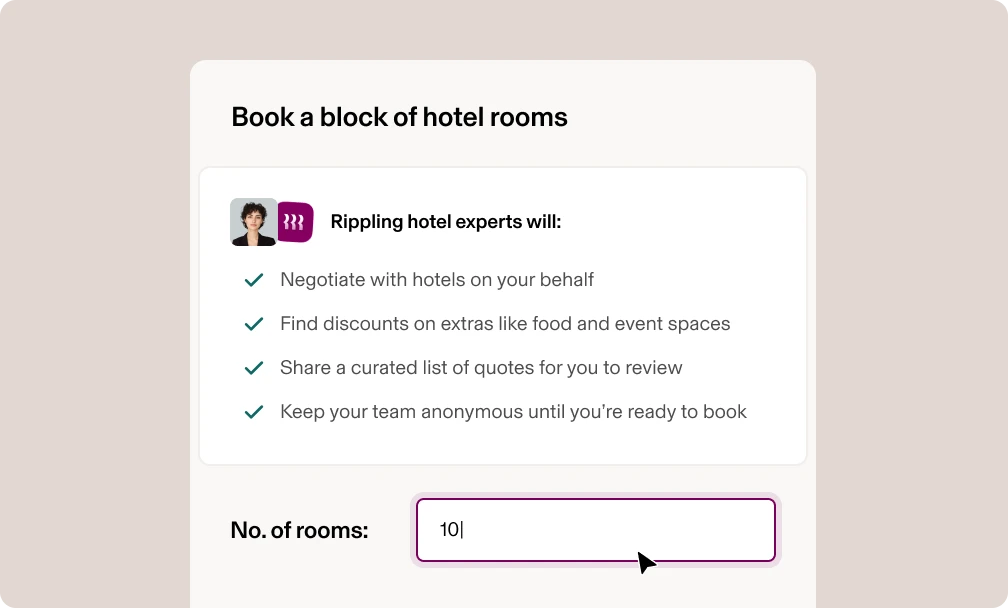
Book 10+ hotel rooms at once in Rippling Travel
Tap My Trips, then Book Room Block, and submit your requirements. A Rippling Travel Expert will contact hotels for you, negotiate heavily discounted rates, and even scope food and event space, all while keeping your business anonymous. You’ll get a quote list to review and book. Learn more.
Personalize and standardize LMS learning journeys at scale
Create custom LMS Learning Paths for everything from compliance certifications to onboarding by linking courses together. You can create linear or flexible paths, set dynamic due dates, enforce checkpoints with quizzes, and automate enrollment based on employee attributes. Learn more.

Compliantly, easily run payroll in Brazil, Mexico, the Philippines, and Spain
Manage your entire global workforce and pay them fast in one system, including employees in Brazil, Mexico, the Philippines, and Spain. Take advantage of powerful cross-company reporting and get help from local payroll experts whenever you need it.
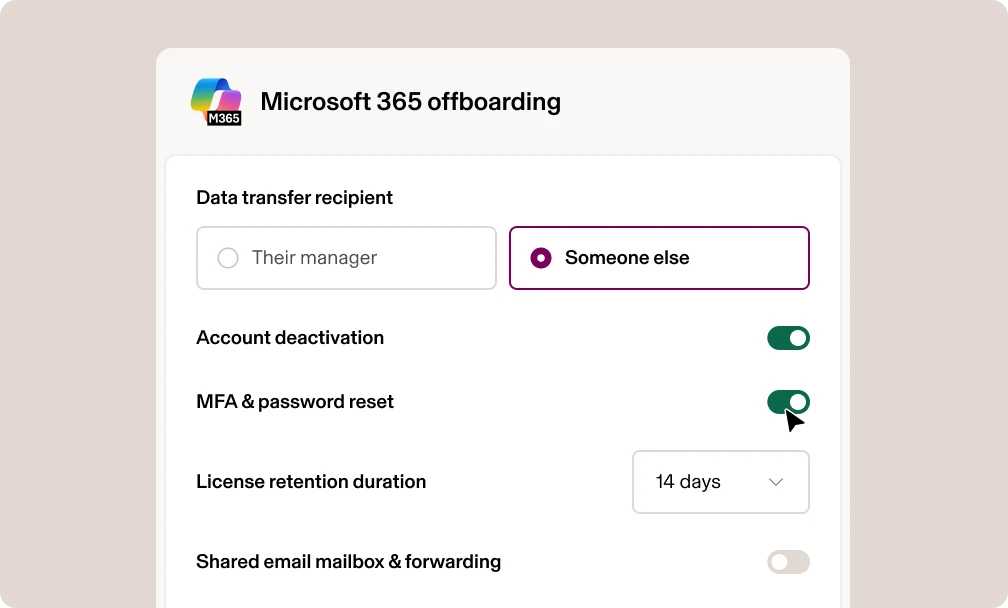
Set advanced offboarding actions for Microsoft 365
Now you can configure offboarding rules for Microsoft 365 accounts, including account deactivation, license reclamation, files and mailbox transfer, and email forwarding. Learn more.
Platform
Apply policies to employee data based on time
Use point-in-time Supergroups to create Supergroups based on historical employee data. For instance, you can exclude employees from a Supergroup who were not based at a specific location at a given time. This way, payroll, scheduling, and eligibility stay accurate, even as roles change. Learn more.
HCM
Route time approvals by job code
You can now build Time & Attendance approval policies based on job codes. That means you can automatically route shifts to the right approvers when employees work specific jobs, locations, or projects. Learn more.
Stay compliant with US leave and holiday default policies
If you’re a US non-EOR company, you now have access to default sick leave and holiday policies to support state and local compliance. These policies are available for you to apply them if and when it makes sense for your team. Existing custom policies will continue to apply. Learn more.
Fix approved payroll correction errors without support tickets
We’ve expanded self-serve payroll actions so you can move an approved payroll correction back to draft or archive it while preserving audit history, making it easy to fix errors without recreating pay runs or filing a support ticket. Learn more about payroll corrections.
Schedule interviews faster with self-serve rescheduling and bulk availability requests
Interview scheduling is now even more efficient in Rippling Recruiting. Recruiters can send availability requests in bulk, and candidates can reschedule or cancel interviews directly from their invite, saving time and reducing email back-and-forth. Learn more.
Streamline pre-offer approvals with a decision-to-offer stage
Route pre-offer decisions through a structured approval chain instead of scattered emails. Recruiters can submit role, level, comp, and justification for review, with every approval, rejection, and comment automatically captured for visibility and compliance. Learn more.
Help interviewers give better interviews by sharing candidate feedback
You can now decide to give interviewers access to feedback from previous interviews after they submit their own feedback. This enables them to better prepare using context from previous interviews without introducing bias. Learn more.
Finance
Auto-attach IRS-compliant receipts to Travel transactions
When employees book flights or prepaid hotels using the Bill to Company payment method, Rippling will automatically generate and attach an IRS-compliant receipt to the related transaction. No manual work required. Learn more.
Filter transactions by client, job, project, and more
Previously, grid filters only worked for standard fields like Vendor, Amount, and Purchase Date. Now, you can filter transactions by custom dimensions such as Client, Job, or Project, allowing you to quickly find, review, and export any data you need. Learn more.
Activate auto-attached invoices and receipts in NetSuite
In addition to syncing NetSuite transactions with Rippling, you can now enable attachment-level sync for NetSuite. To get started, enable auto-attached receipts in the Accounting Integrations tab. Learn more.
Understand and analyze all your spend with an improved Spend Analytics Dashboard
You’ll now see new filtering options and more robust reporting (like “Monthly Expenses by Expense Type”) all in a simpler, more intuitive Spend Analytics Dashboard. Tap the Finances Overview tab and head to Spend Overview to get started. Learn more.
IT
Eliminate email account creation errors with work email policies
With configurable email creation policies, you can auto-generate work email accounts, prevent duplicates, and disable manual edits during hiring and transitions. That means fewer mistakes and less follow-up for busy admins. Learn more.
Strengthen endpoint security with new SentinelOne add-ons
Rippling now supports three new SentinelOne add-ons — Purple AI, Vigilance MDR, and Cloud Funnel — so you can detect threats faster, investigate incidents smarter, and respond with confidence, all from your existing security stack. Learn more.
Take control of RPass sharing with folder-based permissions
Control who sees what in RPass. Sharing permissions are now dictated by folders, eliminating conflicting access rules. Existing multi-purpose folders convert to tags, so you get clean organization without compromising security or visibility. Learn more.
Set up Google SSO faster with a simpler admin experience
Get inbound SSO configured with fewer steps and fewer surprises. Upload metadata XML files directly from your IdP and follow clear prompts that prevent test failures before they happen. Learn more.
Upgrade your Zendesk integration with OAuth2
Improve security and reduce reconnects by upgrading your Zendesk integration to OAuth2. Once upgraded, Rippling automatically refreshes tokens and keeps your connection stable, while existing Basic Auth setups continue working until you’re ready to switch. Learn more.
Connect Rippling to any IdP with the new IdP Connector
Make SSO work with the IdP you already use. The new IdP Connector SKU supports SSO from any provider, includes Okta, Entra, and Google integrations, and lets you add a custom SCIM integration for unsupported IdPs.
Global
Update any benefits enrollment worldwide
Fix enrollment discrepancies, align records with carriers, and prevent downstream payroll and invoicing issues without delays or manual workarounds using offline changes. Just select Benefits, choose the country, find the employee, and click Update to get started. Learn more.
Easily onboard and manage employees in Guatemala and Congo
Onboard employees in 2 minutes or less in Guatemala and Congo with pre-set, automated onboarding flows that collect the right employee data to be compliant. Manage in org charts, maintain policies, and include in your reporting. Learn more about Global HRIS.
Simplify Australia payroll setup with bulk tax imports
Upload Australian tax withholding details in a single file to update key tax information across supported entities without manual, employee-by-employee work. Learn more.
Streamlined authentication for EU and UK Payroll
To meet EU and UK Strong Customer Authentication (SCA) requirements with less friction, you can now complete a one-time verification to trust employees as beneficiaries. After that, additional verification is only required for high-risk actions, such as changing bank details. Learn more.
Get ready for Canada year-end filing with new payroll updates
Review 2025 year-end filing drafts for T4, T4A, and RL-1 in Rippling, automatically apply TD1-IN Indigenous employee tax exemptions, and reduce over-withholding for commissioned employees with TD1X support. All designed to improve accuracy and year-end compliance.
Customers
Join us live and automate like a pro
On February 17 at 11 a.m. PT, learn how Liquid Death, Chess.com, and other HR teams are crushing manual busy work and saving weeks of time with Rippling-only automations. You’ll get practical workflows you can put to use immediately. RSVP here.
Get certified in Rippling Benefits Administration
Build confidence managing employee benefits in Rippling with our latest certification course for Benefits Admins. Learn how to set up, manage, and maintain benefits with ease. SHRM members can earn SHRM PDC credits upon completion. Register for the free course on Rippling U.
Disclaimer

Author
The Rippling Team
Global HR, IT, and Finance know-how directly from the Rippling team.
See Rippling in action
Increase savings, automate busy work, and make better decisions by managing HR, IT, and Finance in one place.