

























Rippling and its affiliates do not provide tax, accounting, or legal advice. This material has been prepared for informational purposes only, and is not intended to provide or be relied on for tax, accounting, or legal advice. You should consult your own tax, accounting, and legal advisors before engaging in any related activities or transactions.
Must-have HRIS RFP template for midsize businesses in 2025

In this article
Midsize businesses face a new set of HR challenges. What worked for 50 employees—spreadsheets, lightweight payroll tools, or basic HRIS platforms—quickly breaks when headcount passes 200. Compliance becomes more complex across multiple states and entities, HR teams are stretched thin, and leadership expects real-time workforce insights. Employees also expect a polished, consumer-grade experience to match what they’d get at larger companies.
The right HRIS for midsize businesses should go beyond the basics. It must unify HR, payroll, benefits, and time in one system, automate complex workflows, and deliver the compliance and reporting rigor required at scale. It should also integrate deeply with ERP, recruiting, and performance systems to reduce reconciliation and give leaders a complete picture of their workforce.
This guide highlights the key areas midsize companies should evaluate in an HRIS, what great looks like, how Rippling stands out, and the RFP questions to ask vendors.
1. Employee system of record
For midsize companies, having a single source of truth is no longer optional. Disconnected systems create duplicate data entry, reporting errors, and compliance gaps.
A strong HRIS should consolidate employee data into one record, automatically syncing with payroll, benefits, and IT.
Rippling’s Employee Graph unifies all employee data, ensuring that every change—from promotions to address updates—flows everywhere it’s needed instantly. No manual work required.
RFP questions to ask
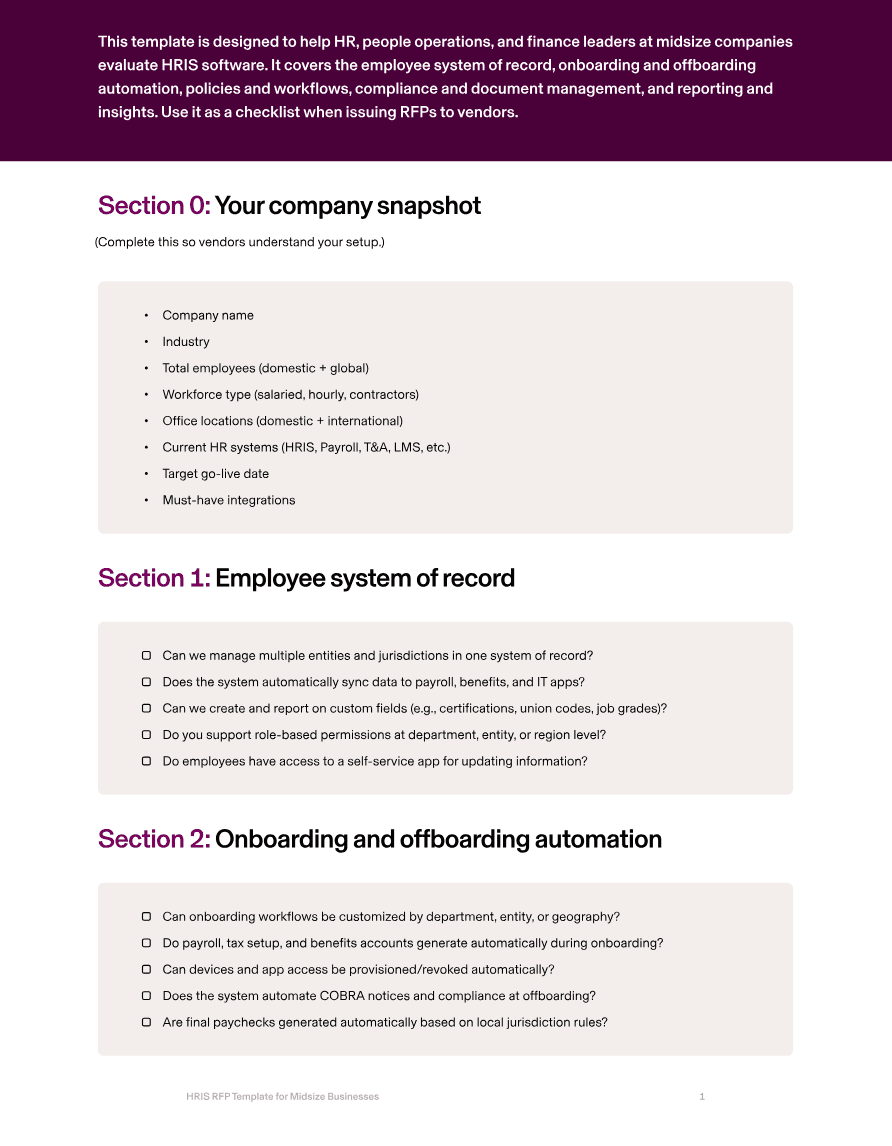
Can we manage multiple entities and jurisdictions in one system of record?
Does the system automatically sync data to payroll, benefits, and IT apps?
Can we create and report on custom fields (e.g., certifications, union codes, job grades)?
Do you support role-based permissions at department, entity, or region level?
Do employees have access to a self-service app for updating information?
2. Onboarding and offboarding automation
At midsize scale, manual onboarding wastes hours and creates inconsistent employee experiences.
An HRIS should automate everything: forms, payroll, benefits, IT provisioning, and compliance steps. Offboarding should be airtight, ensuring final paychecks, COBRA, access removal, and asset recovery happen seamlessly.
Rippling automates both, so HR doesn’t have to chase down checklists across multiple systems.
RFP questions to ask
Can onboarding workflows be customized by department, entity, or geography?
Do payroll, tax setup, and benefits accounts generate automatically during onboarding?
Can devices and app access be provisioned/revoked automatically?
Does the system automate COBRA notices and compliance at offboarding?
Are final paychecks generated automatically based on local jurisdiction rules?
3. Policies, approvals, and workflows
Midsize organizations often need more structured governance: multi-step approvals, conditional policies by role, and workflows that adapt automatically as employees change managers or locations. A modern HRIS should allow you to configure these workflows without code.
Rippling’s workflow builder lets HR teams create multi-step approvals that update dynamically when reporting lines or attributes change, with audit logs for every action.
RFP questions to ask
Can we configure multi-level approval workflows (e.g., for time-off, expenses, promotions)?
Do policies auto-update when employees change role, manager, or entity?
Are workflows mobile-friendly and accessible for busy managers?
Can workflows include deadlines, escalations, and SLA reminders?
Do you provide audit-ready logs of all approvals and actions?
4. Compliance and document management
At midsize scale, compliance gets exponentially harder: multi-state tax and labor laws, ACA and COBRA requirements, and document management across hundreds of employees.
A strong HRIS should automate compliance monitoring, assign documents automatically by role or region, and surface risks proactively.
Rippling ties compliance directly to the employee record, so every change triggers the right policies and documents automatically.
RFP questions to ask
How do you manage compliance across multiple states and entities?
Do you automate ACA, COBRA, and I-9/E-Verify requirements?
Can we assign and track documents by role, department, or location?
Do you provide expiration and renewal alerts for compliance docs?
What compliance certifications do you hold (SOC 2, ISO, GDPR)?
5. Reporting and insights
Midsize companies need more than headcount counts—they need advanced analytics. Finance and HR leaders want reports segmented by entity, region, department, or cost center, as well as predictive analytics on attrition and compensation.
A modern HRIS should provide dashboards, variance analysis, and exports to ERP and BI tools. Rippling provides real-time reporting across all employee data, with segmentation and customizable dashboards that give leaders actionable insights.
RFP questions to ask
Do you provide entity- and department-level reporting out of the box?
Can we build custom dashboards and reports without technical support?
Do you support variance reporting across time (e.g., headcount trends, comp changes)?
Can reports be scheduled and shared automatically with leadership?
Do you integrate with ERP and BI tools (e.g., NetSuite, Tableau)?
How Rippling helps midsize businesses
Rippling HRIS is built to handle the complexity of midsize companies without adding unnecessary overhead. With Rippling, you get a single source of truth for all employee data, eliminating errors and manual reconciliation across systems. Payroll, benefits, IT, and time data sync automatically, so HR teams spend less time on admin and more time driving strategy.
Onboarding and offboarding are automated end-to-end, from payroll setup and benefits enrollment to device provisioning and COBRA notices. Policies and workflows adapt automatically as employees change roles or locations, with multi-step approvals and audit logs built in.
Rippling also helps midsize organizations stay compliant across multiple states and entities. ACA and COBRA reporting is automated, compliance risks are surfaced proactively, and SOC 2/ISO-certified security ensures your employee data is safe.
And because Rippling unifies HR, payroll, benefits, and IT, midsize companies save money and reduce complexity by consolidating multiple systems into one platform. As your needs grow, Rippling scales seamlessly—supporting multi-entity structures and global expansion without requiring a system change.
With Rippling HRIS, midsize businesses can:
Manage multiple entities and jurisdictions in one system of record
Automate onboarding, offboarding, and compliance workflows at scale
Configure policies and approvals that adapt dynamically
Stay compliant with ACA, COBRA, and multi-state rules automatically
Empower employees with modern self-service access
Generate segmented reports and dashboards for real-time insights
Rippling RFP for HRIS for midsize businesses example
Section | Question to ask | Rippling Answer |
Employee system of record | Can we manage multiple entities and jurisdictions in one system of record? | Yes—Rippling supports multi-entity and multi-jurisdiction employee records in a single system of truth. |
Does the system automatically sync data to payroll, benefits, and IT apps? | Yes—Rippling automatically syncs employee data across payroll, benefits, and IT apps in real time. | |
Can we create and report on custom fields (e.g., certifications, union codes, job grades)? | Yes—Rippling supports unlimited custom fields and reporting across them. | |
Do you support role-based permissions at department, entity, or region level? | Yes—Rippling provides granular role-based permissions at department, entity, and region levels. | |
Do employees have access to a self-service app for updating information? | Yes—employees can use Rippling’s mobile and web apps to update information and access records. | |
Onboarding and offboarding automation | Can onboarding workflows be customized by department, entity, or geography? | Yes—Rippling supports configurable onboarding workflows by department, entity, or location. |
Do payroll, tax setup, and benefits accounts generate automatically during onboarding? | Yes—Rippling automatically generates payroll, tax setup, and benefits accounts during onboarding. | |
Can devices and app access be provisioned/revoked automatically? | Yes—Rippling provisions and deprovisions apps and devices automatically based on onboarding/offboarding status. | |
Does the system automate COBRA notices and compliance at offboarding? | Yes—Rippling automates COBRA notices and compliance workflows at termination. | |
Are final paychecks generated automatically based on local jurisdiction rules? | Yes—Rippling generates compliant final paychecks automatically at offboarding. | |
Policies, approvals, and workflows | Can we configure multi-level approval workflows (e.g., for time-off, expenses, promotions)? | Yes—Rippling allows configuration of multi-level, multi-step approval workflows for time-off, expenses, promotions, and more. |
Do policies auto-update when employees change role, manager, or entity? | Yes—Rippling updates workflows and policies automatically when employee attributes change. | |
Are workflows mobile-friendly and accessible for busy managers? | Yes—Rippling approvals and workflows are accessible via mobile, email, and Slack. | |
Can workflows include deadlines, escalations, and SLA reminders? | Yes—Rippling workflows include SLA timers, escalation paths, and reminders for overdue tasks. | |
Do you provide audit-ready logs of all approvals and actions? | Yes—Rippling maintains immutable, exportable logs of all workflows and approvals. | |
Compliance and document management | How do you manage compliance across multiple states and entities? | Rippling automates compliance for multi-state and multi-entity organizations with jurisdiction-specific rules. |
Do you automate ACA, COBRA, and I-9/E-Verify requirements? | Yes—Rippling automates ACA, COBRA, I-9, and E-Verify compliance workflows. | |
Can we assign and track documents by role, department, or location? | Yes—Rippling allows document assignment and tracking by role, department, entity, or location. | |
Do you provide expiration and renewal alerts for compliance docs? | Yes—Rippling provides expiration alerts and renewal notifications for compliance-related documents. | |
What compliance certifications do you hold (SOC 2, ISO, GDPR)? | Rippling is SOC 2 Type II certified, ISO 27001 certified, and GDPR compliant. | |
Reporting and insights | Do you provide entity- and department-level reporting out of the box? | Yes—Rippling includes entity- and department-level reporting and dashboards. |
Can we build custom dashboards and reports without technical support? | Yes—Rippling provides a no-code report builder for custom dashboards and reports. | |
Do you support variance reporting across time (e.g., headcount trends, comp changes)? | Yes—Rippling supports variance analysis across pay periods, headcount, and compensation. | |
Can reports be scheduled and shared automatically with leadership? | Yes—Rippling allows reports to be scheduled and shared automatically with leadership teams. | |
Do you integrate with ERP and BI tools (e.g., NetSuite, Tableau)? | Yes—Rippling integrates with ERP systems like NetSuite and accounting systems like QuickBooks and Xero, and exports to BI tools. |
Ready to evaluate vendors?
Disclaimer

Author
The Rippling Team
Global HR, IT, and Finance know-how directly from the Rippling team.
Hubs
See Rippling in action
Increase savings, automate busy work, and make better decisions by managing HR, IT, and Finance in one place.