

























Rippling and its affiliates do not provide tax, accounting, or legal advice. This material has been prepared for informational purposes only, and is not intended to provide or be relied on for tax, accounting, or legal advice. You should consult your own tax, accounting, and legal advisors before engaging in any related activities or transactions.
Must-have IT management software RFP template for startups in 2025
![[Blog | Hero] Devices](/_next/image?url=https%3A%2F%2Fimages.ctfassets.net%2Fk0itp0ir7ty4%2F5nksOIHhb3tv1YpUa2P5kd%2F458d5bccd68fb069bb122101c4a80570%2FDevices_-_Spot.jpg&w=2880&q=75)
In this article
For startups, IT isn’t usually its own department — it’s the founder, the COO, or maybe one ops hire handling laptops, SaaS accounts, and provisioning. But as headcount grows, spreadsheets and ad hoc processes create major risks: lost devices, shadow IT, security gaps, and hours wasted on manual onboarding.
The right IT management platform should give lean teams control without complexity. It should unify identity, devices, and inventory in one system, automate onboarding/offboarding, enforce basic security (MFA, encryption, patching), and integrate with HR so every change in the employee record flows everywhere.
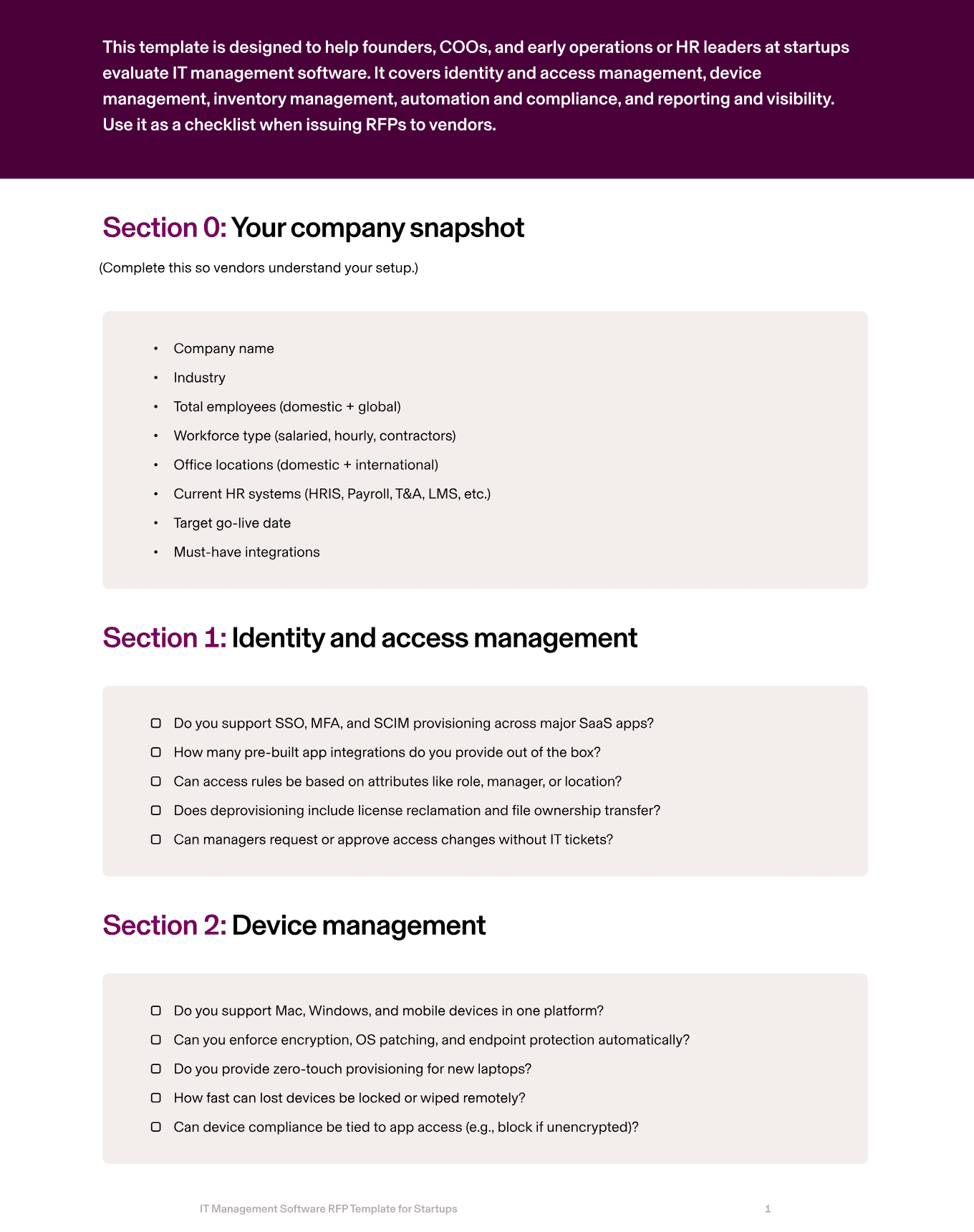
This guide shows the critical areas startups should evaluate in an IT management RFP, what best-in-class looks like, and the RFP questions to ask vendors. Plus, we’ll give you a downloadable guide so you can start evaluating IT management software ASAP.
1. Identity and access management
Startups juggle dozens of SaaS apps. Without automation, new hires wait days for access while ex-employees keep lingering accounts. A modern IT system should provide SSO, MFA, and automated provisioning/deprovisioning tied directly to HR data.
Rippling IT’s IAM software 800+ apps instantly, enforces MFA by role, and revokes access the moment someone leaves.
RFP questions to ask
Do you support SSO, MFA, and SCIM provisioning across major SaaS apps?
How many pre-built app integrations do you provide out of the box?
Can access rules be based on attributes like role, manager, or location?
Does deprovisioning include license reclamation and file ownership transfer?
Can managers request or approve access changes without IT tickets?
2. Device management
Every startup laptop is a security liability if it’s unencrypted or unpatched. Device management should enforce encryption, OS patching, and endpoint protection automatically, and enable remote wipe for lost/stolen devices.
Rippling IT’s MDM manages Mac, Windows, iOS, and iPadOS devices in one system, with zero-touch deployment and built-in endpoint protection.
RFP questions to ask
Do you support Mac, Windows, and mobile devices in one platform?
Can you enforce encryption, OS patching, and endpoint protection automatically?
Do you provide zero-touch provisioning for new laptops?
How fast can lost devices be locked or wiped remotely?
Can device compliance be tied to app access (e.g., block if unencrypted)?
3. Inventory management
Spreadsheets don’t cut it for tracking devices. Startups need visibility into who has which laptop, whether it’s compliant, and where it is.
Rippling IT’s inventory management ties every device to the employee record, automates shipping and returns from global warehouses, and tracks compliance in real time.
RFP questions to ask
Can devices be purchased, stored, and shipped directly through your platform?
Do you provide global warehouses and shipping for new hires?
How are device returns handled during offboarding?
Do you track compliance status (encryption, OS version) in the inventory dashboard?
Can inventory reporting be exported for finance or audits?
4. Automation and compliance
Startups can’t afford IT busywork. The right system should automate onboarding and offboarding end-to-end: provision apps, ship laptops, apply policies, revoke access, and log every step.
It should also surface compliance risks — like unencrypted laptops — before they become incidents. Rippling IT automates lifecycle workflows tied to HR data and generates audit-ready logs for SOC 2 and ISO compliance.
RFP questions to ask
Do workflows trigger automatically when employees are hired, promoted, or terminated?
Can we customize onboarding/offboarding flows without coding?
Do you surface compliance alerts (unencrypted device, missing MFA) in real time?
Are all IT actions logged immutably for audit purposes?
What certifications do you hold (SOC 2, ISO 27001)?
5. Reporting and visibility
Founders and ops leaders need quick answers: how many laptops are overdue for patching, which contractors still have access, where spend is going. IT management software should provide dashboards and exports that non-technical users can run.
Rippling IT gives real-time reports across identity, devices, and inventory — all tied to the employee record.
RFP questions to ask
What standard reports are included (device compliance, app usage, access logs)?
Can non-technical users build and schedule custom reports?
Can data be segmented by team, location, or employment type?
Do you support exports to CSV, Excel, or BI tools?
How do you enforce row-level security in shared reports?
How Rippling IT helps startups
Rippling IT unifies identity, devices, and inventory in one system built on your employee record. You can connect Rippling IT to your employee data through either Rippling’s HRIS software or a third-party HR solution like ADP or Workday.
That means when you hire someone, they’re provisioned with every app, account, and device they need automatically. When they leave, access is revoked, laptops are returned, and audit logs are generated — all without IT intervention.
For lean startup teams, this saves hours per hire and dramatically reduces risk.
Security is enforced by default: MFA, encryption, and patching policies apply across devices; non-compliant devices are flagged instantly.
Rippling’s Device Store and warehouses ship pre-configured laptops globally, while inventory dashboards show where every asset is, who it belongs to, and whether it’s compliant.
With Rippling IT, startups can:
Provision and deprovision apps automatically with SSO and SCIM
Enforce MFA, encryption, and patching on every device
Ship and retrieve laptops globally without spreadsheets
Automate onboarding and offboarding tied directly to HR data
Generate real-time reports for compliance and audits
Rippling RFP for IT management software for startups example
Section | Question to ask | Rippling Answer |
|---|---|---|
Identity and access management | Do you support SSO, MFA, and SCIM provisioning across major SaaS apps? | Yes — Rippling IT supports SSO, MFA enforcement, and SCIM provisioning across 800+ SaaS apps. |
How many pre-built app integrations do you provide out of the box? | Rippling IT offers 800+ pre-built integrations with common SaaS apps. | |
Can access rules be based on attributes like role, manager, or location? | Yes — Rippling IT ties access policies directly to HR attributes such as role, manager, department, or location. | |
Does deprovisioning include license reclamation and file ownership transfer? | Yes — Rippling IT automatically reclaims licenses and transfers file ownership during deprovisioning. | |
Can managers request or approve access changes without IT tickets? | Yes — Rippling IT supports manager-initiated access requests and approvals through workflows. | |
Device management | Do you support Mac, Windows, and mobile devices in one platform? | Yes — Rippling IT manages macOS, Windows, iOS, and iPadOS devices in one platform. |
Can you enforce encryption, OS patching, and endpoint protection automatically? | Yes — Rippling IT enforces encryption, patching, password policies, and endpoint protection automatically. | |
Do you provide zero-touch provisioning for new laptops? | Yes — Rippling IT ships devices pre-configured with zero-touch deployment. | |
How fast can lost devices be locked or wiped remotely? | Devices can be locked or wiped instantly through Rippling IT’s admin console. | |
Can device compliance be tied to app access (e.g., block if unencrypted)? | Yes — Rippling IT ties app access to device compliance, blocking logins if devices don’t meet requirements. | |
Inventory management | Can devices be purchased, stored, and shipped directly through your platform? | Yes — Rippling IT offers a Device Store and warehouses where businesses can purchase, store, and ship devices globally. |
Do you provide global warehouses and shipping for new hires? | Yes — Rippling IT provides global warehouses and direct-to-employee shipping. | |
How are device returns handled during offboarding? | Offboarding workflows automatically trigger return kits and track device retrieval. | |
Do you track compliance status (encryption, OS version) in the inventory dashboard? | Yes — Rippling IT provides real-time compliance tracking in the inventory dashboard. | |
Can inventory reporting be exported for finance or audits? | Yes — inventory reports can be exported for finance teams and compliance audits. | |
Automation and compliance | Do workflows trigger automatically when employees are hired, promoted, or terminated? | Yes — Rippling IT automates workflows tied to HR events such as hiring, promotions, and terminations. |
Can we customize onboarding/offboarding flows without coding? | Yes — Rippling IT includes a no-code workflow builder for onboarding and offboarding processes. | |
Do you surface compliance alerts (unencrypted device, missing MFA) in real time? | Yes — Rippling IT surfaces compliance alerts for unencrypted devices, missing MFA, and other risks in real time. | |
Are all IT actions logged immutably for audit purposes? | Yes — Rippling IT generates immutable logs of all IT actions, exportable for audits. | |
What certifications do you hold (SOC 2, ISO 27001)? | Rippling IT is SOC 2 Type II certified and ISO 27001 certified. | |
Reporting and visibility | What standard reports are included (device compliance, app usage, access logs)? | Rippling IT provides standard reports for device compliance, app usage, access logs, and more. |
Can non-technical users build and schedule custom reports? | Yes — Rippling IT provides a no-code reporting builder with scheduling options. | |
Can data be segmented by team, location, or employment type? | Yes — Rippling IT supports segmentation of reports by team, department, location, and worker type. | |
Do you support exports to CSV, Excel, or BI tools? | Yes — Rippling IT supports exports to CSV, Excel, Google Sheets, and BI platforms. | |
How do you enforce row-level security in shared reports? | Yes — Rippling IT enforces role-based access and row-level security for all reports and exports. |
Ready to evaluate vendors?
Disclaimer

Author
The Rippling Team
Global HR, IT, and Finance know-how directly from the Rippling team.
Hubs
See Rippling in action
Increase savings, automate busy work, and make better decisions by managing HR, IT, and Finance in one place.