




















HR automation is the strategy of using software to handle repeatable HR tasks, like sending reminders, handling routine questions, and updating records. It works by using employee data, triggers, and rules to start an automated workflow when something changes, such as when an employee receives a promotion or requests paid time off (PTO).
How HR automation helps HR teams work smarter at scale
In this article
Key takeaways
HR automation helps teams reduce repetitive admin across recruiting, onboarding, offboarding, payroll, and compliance, freeing up time for high-value strategies.
The strongest HR automation workflows start with connected employee data, integrated systems, clear rules, and approvals that keep humans in control.
Start small by automating high-volume, rule-based tasks first. From there, track key metrics and gather feedback to gradually scale automation over time.
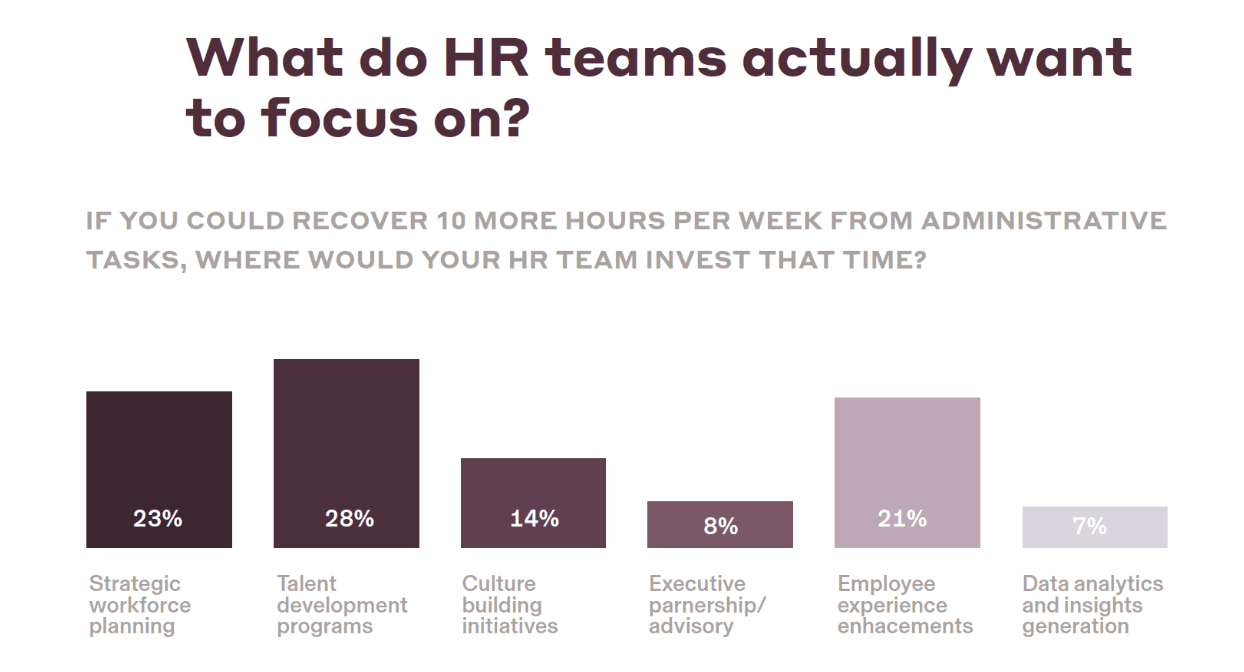
Today’s HR teams are being asked to support workforce planning, build hiring and retention strategies, and contribute to wider business initiatives. But this can be challenging when 90% of HR leaders still lose more than a quarter of their day to admin.
More time spent on tasks like updating records, onboarding, and offboarding means less time for the projects that keep employees happy and businesses growing.
Source: Rippling, The State of HR in 2025
HR automation helps to solve this time crunch by automating the admin that eats into workdays. This gives teams more breathing room for high-value work. In this article, we’ll explore how AI automation can ease HR pressure and show you how to get started step by step.
The benefits of HR automation
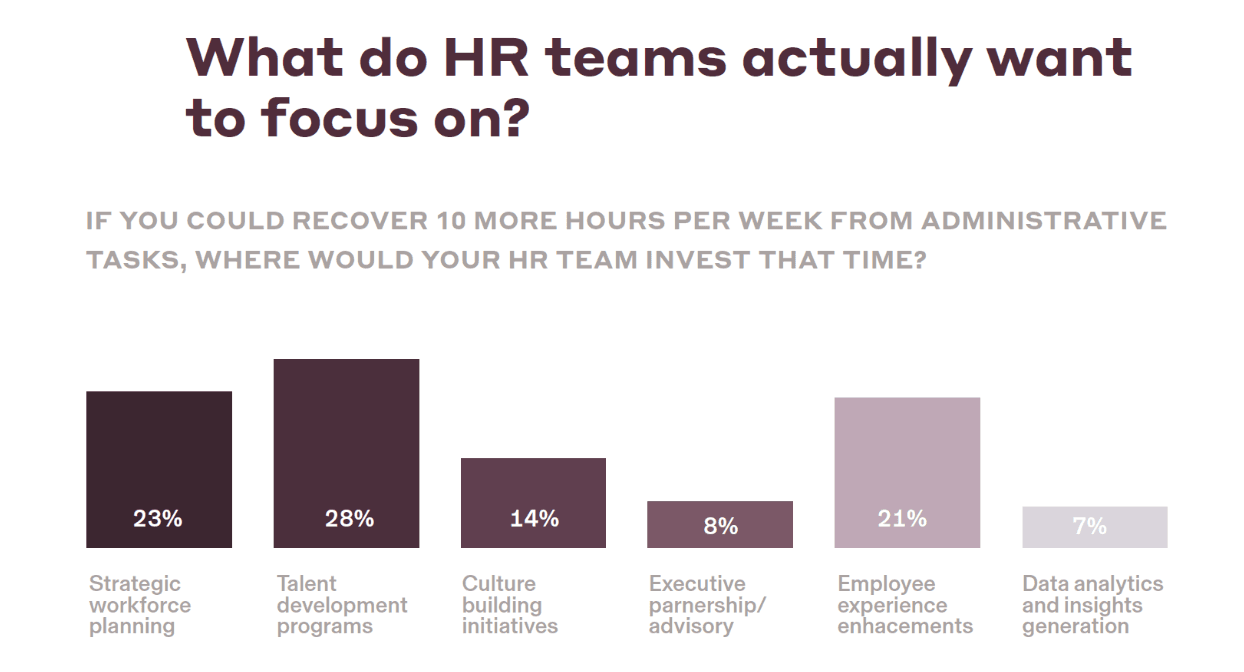
The headline benefit of human resources automation is time saved. When you can automate HR processes that slow teams down, HR teams get more bandwidth for work that needs a human touch, like strategic workforce planning and talent development.
Source: Rippling, The State of HR in 2025
But the benefits go beyond “less admin”. HR automation can transform the way your organization scales, makes decisions, handles compliance, and manages people across the entire employee lifecycle. Here are five advantages that stand out.
1. Fewer routine tasks leave more time for strategic work
While 65% of senior leaders see HR as a key business enabler, 51% agree admin burden is the main barrier stopping HR from contributing to broader strategy. Tasks like updating records and processing payroll create a to-do list that never seems to stop growing.
HR automation turns these repeatable steps into automated workflows, giving teams more space for tasks that need a human touch, like workforce planning and employee support.
2. Consistent rules leave less room for errors
Manual updates leave room for mistakes, especially when your HR team is short on time. Automation makes these processes more consistent because workflows follow predictable rules, leaving less room for errors and miscalculations.
This is particularly handy for areas that leave little room for error, like payroll. It also helps to improve compliance by reducing the risk of missed steps and incomplete records.
3. Better data equals better decisions
HR teams need data to make reliable decisions about hiring, performance, retention, and compensation, but this is hard when information is scattered across systems.
With HR process automation, data updates as soon as the work happens. This gives leaders and HR teams a real-time view of onboarding progress, turnover, retention, and other workforce insights without having to manually update the system each time.
4. Clear records support stronger compliance and oversight
Compliance tasks are easy to miss when they depend on manual follow-ups and spreadsheets.
HR compliance automation helps teams track required documents, training, approvals, and deadlines in one place. That means more accurate records and fewer missed deadlines.
5. More effective HR means happier employees
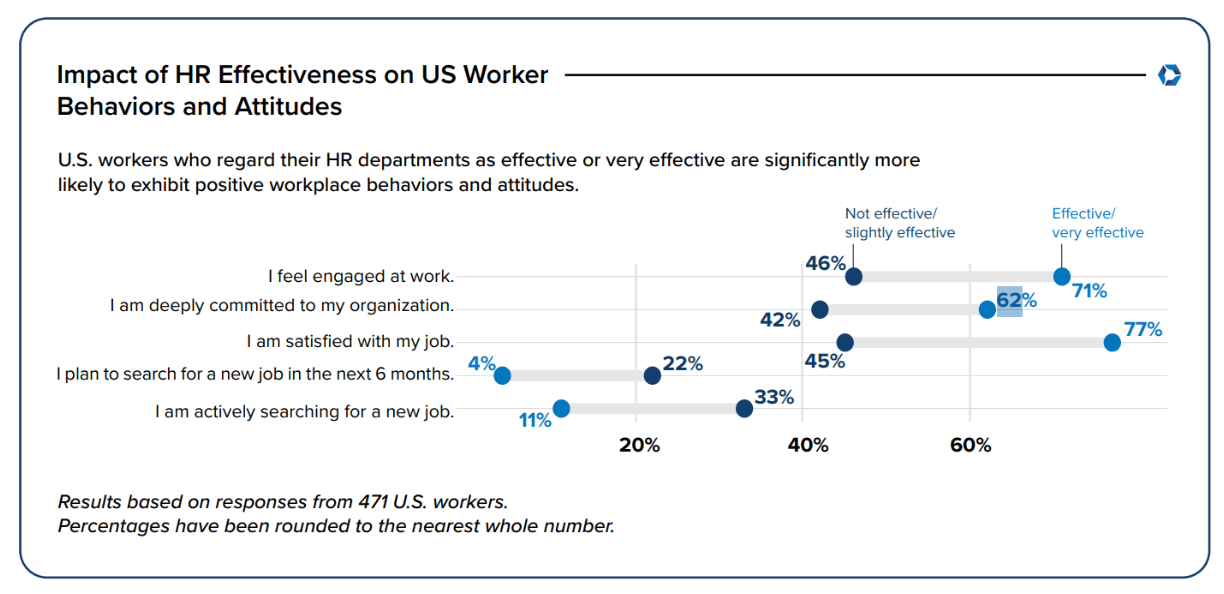
US workers who see their HR department as effective or very effective are 32% more likely to feel satisfied at work, 25% more likely to feel engaged, and 20% more likely to be deeply committed to their role than those who consider their HR ineffective.
When onboarding is smooth, changes are handled quickly, self-service empowers faster answers, and HR has time for real conversations, the benefits go beyond one team.
Source: 2025 SHRM State of the Workplace Report
Start with the workflows that slow HR down
You don’t need to automate your entire department at once. Start with a few core HR automations for tasks that are repetitive and time-consuming. Here are some options:
1. Recruiting
HR teams need to move candidates through applications, interviews, decisions, and background checks while keeping communication clear throughout. With hiring automation, different workflows could trigger once a candidate enters your recruitment software following an interview, and after they’re accepted. This could mean:
Moving candidates to the next stage after an application is approved
Sending interview reminders to candidates as well as hiring managers
Prompting interviewers to submit their candidate feedback after each call
Notifying hiring managers when it’s time to make a final decision
Adding the new hire to the HR system to trigger onboarding automation workflows
2. Employee onboarding
Onboarding is a great starting point for automation because it has a lot of moving parts. HR needs to send documents, provide training, set up payroll, and ensure access to apps, all before the new hire’s first day. With an automated employee onboarding process, a workforce management platform could:
Send the new hire a welcome email with next steps before their first day
Collect personal details, tax forms, and signed policies in advance
Run a full background check and forward the results to your HR team
Trigger payroll setup and prorate their first paycheck, depending on start date
Set up the employee’s payroll tax accounts and workplace benefits
Assign training modules to the new employee based on their role and location
Create a to-do list for HR, such as first-week check-ins or team introductions
3. Payroll processing
Payroll was ranked as the number-one admin time sink by 36% of HR professionals, and it’s easy to see why. Checking records and verifying details before each pay run takes time. With the average error costing businesses $291, it can also be unforgiving if you make a mistake. Payroll automation for HR teams can help with this. For instance, strong payroll software could:
Update payroll automatically whenever someone gets a raise or promotion
Prorate pay when someone starts or leaves partway through a pay cycle
Sync approved hours, overtime, PTO, and leave before the payroll deadline
Update deductions if an employee changes benefits
Flag missing hours or any unusual pay changes for HR review
4. Benefits administration with fewer loose ends
Benefits administration is another area where teams can quickly get pulled toward manual follow-ups.
Benefits administration automation keeps things moving without HR overseeing every update. For instance, you might set up a workflow that could automatically:
Provide the right sign-up forms as soon as someone is eligible for a perk
Send out a deadline reminder if employees haven’t yet chosen their benefits
Update payroll deductions when benefits change
Show HR which forms are missing or incomplete so they can follow up
Keep a record of each employee’s benefits choices for later review
5. Employee changes (promotions, relocations, exits)
Employee changes create a surprising amount of admin. If someone gets promoted, moves to a new state or team, hits an important milestone, or leaves the company, HR often needs to manage payroll, training, benefits, permissions, and communications all at once. Automated workflows that run whenever you update specific details in your HR system can ease this burden:
Receive updated payroll terms after they receive a promotion or raise
Be automatically assigned training if they move into a new role
Get access to new apps or groups for their new team
Receive updated benefits information once they move to a new state
Be prompted to complete any location-specific tax or compliance forms
Have app and system access removed when their employment ends
6. Performance, training, and development
HR performance management platforms can keep employee development on track by automating workflows around reviews. That could mean:
Scheduling performance reviews in advance to keep everyone in the loop
Sending reminders to managers and employees before those deadlines
Assigning ongoing training based on an employee’s recent review
Showing HR which reviews or development tasks are overdue
7. Compliance and document tracking
While HR teams aren’t usually responsible for legal compliance alone, they still need to collect signed documents, keep track of policies, and keep employee records updated. HR compliance automation software like Rippling could:
Flag missing tax forms and employee documents while there’s time to respond
Remind employees when key reports and documents are overdue
Show HR the full picture, including which tasks are currently incomplete
Build a detailed audit trail that’s ready for future compliance checks
How HR automation works behind the scenes
HR automation can be simple or sophisticated, but the basic idea is always the same. Something happens in your HR system, the platform sees that change, and then triggers the next step based on predefined rules. Let’s take a closer look at how it works.
Key component | What it does | Example |
|---|---|---|
Connected employee data | Gives workflows the context they need to take the right action | A role change automatically updates across HR, payroll, IT, and finance |
Triggers and rules | Start workflows and decide what should happen next | A promotion triggers a compensation review, then a payroll update |
Approvals | Keep humans in control of important decisions | A PTO request routes to a manager before it triggers a change to the time-off balance |
Self-service portals | Let employees complete routine tasks without getting HR involved | An employee submits a time off request in their portal |
Audit trails and analytics | Show what happened, why, and where there’s room to improve | HR builds a report of employee performance to inform a review |
Employee data gives every workflow context
Automation starts with reliable employee data, like role, location, employment package, performance, and attendance. These details help the system decide which action to take based on the employee’s situation.
For instance, a full-time employee in California will need different tax forms than a contractor in Idaho. Similarly, a manager will require different app permissions than a freelancer. A workforce automation platform like Rippling can help at this stage by bringing your employee data together with out-of-the-box integrations. This means one update, like a role change, can move through all of your systems without HR re-entering information each time.
Triggers and rules decide what happens next
HR automation systems use triggers and rules to determine how to act. A trigger is an event that starts a workflow; a rule decides what happens when that trigger occurs.
Think of it as “if this happens, do that”. For instance, adding a new hire to the HR system might trigger onboarding tasks. The rules behind that workflow would then decide which training modules to send, whether they need a company device, and what payroll steps need to happen based on their role or location.
Workflows can also run in a sequence. For instance, if an employee gets a promotion, this could trigger a compensation review. Once approved, that workflow can trigger an update to payroll. Each step builds on the last so HR doesn’t have to push things along at each stage.
Approvals keep humans in charge
Automation shouldn’t be making every decision alone. Teams still need to review and approve changes with their own judgment. The difference is that the system routes that approval to the right person automatically.
For example, if an employee asks for time off, a workflow would wait for the manager’s approval before updating the PTO balance and syncing with payroll. This keeps humans at the center of decision-making without leaving HR to manage every update alone.
Self-service portals keep basic tasks moving
Not every HR request demands a message to HR. Many employees just want to complete a simple task, like requesting time off, finding a document, or updating their work details.
Self-service portals give employees a place to handle routine tasks, like viewing their schedule or accessing pay stubs, without needing HR support. You can also tie self-service tools back to your automations. For instance, with an all-in-one platform like Rippling, a team member could submit a PTO request via their portal, which would then route to a manager and update their time-off balance once approved.
Audit trails and analytics make work easier to track
Automation is only useful if HR can see what’s happening and why. Centralized records and audit trails keep a log of activity, such as what triggered a workflow, who approved a step, which tasks are complete, and which are still outstanding. From there, HR analytics and reporting tools let teams build visual dashboards so they can track performance and make informed decisions.
To learn more, see how Hovercraft uses Rippling to manage its workforce across 9 states.
How to implement HR automation
HR automation works best when you implement it gradually with a structured approach. You don’t need to automate everything at once. The goal is a practical HR automation strategy that delivers quick wins, then scales up as your team gets more confident. Here’s a seven-step pathway to roll out HR automation without overwhelming your team.
1. Find the work that’s slowing your teams down
Start by identifying the tasks that would benefit from automation. In general, the best candidates are:
High-volume and repetitive, like onboarding or answering employee requests
Rule-based, like approvals or reminders
Prone to costly errors, like payroll updates
Dependent on cross-team collaboration, such as recruitment
2. Prioritize the workflows with the biggest impact
Narrow your list down to one or two options. You’re looking for workflows that are predictable and have a clear payoff—saving time, reducing errors, or improving the employee experience. Onboarding is often a strong first choice because the steps follow a routine pattern. Payroll is also a good early target because it’s time-sensitive and expensive when mistakes happen.
3. Choose a platform that connects your systems
A simple tool might automate one task, but this still leaves your HR team to move information between systems. Almost 97% of HR leaders are now in favor of consolidating their tools in one place. A strong alternative is to choose all-in-one HR software that offers centralized employee data, strong integrations, configurable permissions, flexible rules, employee self-service, a payroll engine, and audit trails.

Source: Rippling, The State of The People Leader
A strong alternative is to choose all-in-one HR software that offers:
Centralized employee data, so every workflow is built on real-time context
Strong integrations, so the platform plays nicely with the tools you already use
Configurable permissions, so the right people can edit and approve workflows
Flexible rules based on role, location, department, or employee type
Employee self-service for pay stubs, leave, and personal records
A payroll engine and tax system built for US businesses
Reliable support to help your team during setup and rollout
Ease of use, so teams can build and adjust workflows without calling in help
Audit trails, reporting, and analytics to support visibility and compliance
By prioritizing these criteria, you’re picking software that supports long-term HR operations rather than one-off fixes.
4. Clean up your employee data
The next step is making sure your employee data is accurate enough for AI automation. Even strong workflows can break down if records are incomplete or outdated. Check for:
Missing employee details, like location or employment type
Outdated job titles or departments
Duplicate records that could create confusion across systems
Inconsistent pay, benefits, time, or attendance data
Old permissions or access rights that no longer apply
A powerful HR automation platform like Rippling can help with this process by unifying data, standardizing context, surfacing inconsistencies, and syncing information across teams.
5. Map the process before you automate
Before you automate a workflow, write down how the process should look from start to finish. This will keep your goal clear and prevent messy processes. Follow a simple structure like:
The trigger: What starts the workflow?
The steps: What needs to happen when that workflow begins?
The owner: Who needs to act or approve the workflow?
The rules: What changes by role, location, or department?
The outcome: What should be completed by the end?
Once you can define each of these elements, you’re ready to start building your automation.
6. Implement one workflow at a time before scaling
Start with a single workflow and test it properly with common scenarios and edge cases.
For instance, what happens if a manager forgets to approve for a full working day? What happens if someone changes role and location at the same time? Essentially, try to make the logic break before your team does it for you.
After rollout, gather feedback from employees before scaling up. Doing so will help you catch and fix problems with the automation and see if teams are adopting the new way of working.
7. Track the results and keep improving
HR automation works best as an ongoing strategy. Measure whether it’s actually helping using useful HR metrics like time saved, task completion rates, payroll errors, and approval turnaround times. If a workflow keeps getting stuck, adjust the rules or data behind it.
Benefits employees love. Automation HR teams need.
The challenges to plan ahead for when you automate
HR automation can save time and keep work moving, but all of that depends on a strong setup. Here are five HR system integration challenges to plan ahead for, and how to solve them.
Fragmented systems: 82% of HR teams use four or more tools each month, and over a third (36%) rely on seven or more. When these systems can’t talk to each other, automations can’t work from the full picture. Make data unification a priority.
Messy data: Missing, inconsistent fields and duplicate records can all cause problems after you roll out a new tool. Prioritize clean data to give your automation a reliable starting point.
Employee resistance: Change can be daunting. Clearly communicate the value of automation to your employees, and provide them with training as needed.
Automating too much: Not everything needs automation. Some moments are best left to human judgment, especially performance conversations and employee relations.
Security and privacy: HR holds sensitive information. Build your automations around role-based permissions, approval controls, and audit trails to make sure only the right people can access sensitive information.
How Fluxx turns offboarding into a one-click workflow
With just three people handling HR for an entire organization, Fluxx is always looking for smarter ways to cut down on time-hungry admin tasks.
Offboarding was one of those tasks. Previously, Fluxx’s process relied on manual tracking, spreadsheets, and timestamps to prove when each system had been deprovisioned. To solve this, Fluxx used Rippling to build a custom offboarding workflow that triggers each time a termination is submitted. The system then immediately:
Assigns offboarding tasks to the right teams and stakeholders
Sends each stakeholder a clear list of next steps to complete
Tracks when each task has been completed
Captures timestamps automatically for compliance records
Creates a clear audit trail for SOC 2 evidence
Put together, this replaces manual spreadsheet updates with a trusted process. Fluxx now has a way to keep sensitive processes on track, remove manual follow-up, and give teams a clear system of record for confident compliance.
Make HR automation do more for your teams
HR automation will never replace HR teams, but it will remove the admin that stops them from doing their best work. When you can automate tedious tasks like payroll, compliance, hiring, and offboarding, HR teams get more time for person-centric strategies.
What matters most is a strong foundation. Reliable employee data, approvals, clear rules, and audit trails aren’t the flashiest part of HR automation, but they underpin everything. Get the basics right with a unified platform and everything else will follow suit.
Rippling is an all-in-one workforce management system built for HR, payroll, IT, and finance teams that want to get more out of data, automation, and AI. Book a time for your live Rippling demo today to see how our platform can power HR workflow automation for your team.
Frequently Asked Questions
What is HR automation and how does it work?
What are some good HR automation examples?
Good HR automation for businesses starts with the repetitive tasks that slow teams down. Strong HR automation use cases include payroll admin, benefits administration, employee onboarding and offboarding, recruiting workflows, performance management, and compliance and document tracking.
What should I look for in HR workflow management systems?
Look for systems that support centralized employee data, integrations, flexible workflows, clear guardrails, audit trails, and strong security features. This is how you know you’re getting an HR process automation platform built to stay secure and scalable as you grow.
Will HR automation work for small businesses?
Yes. In fact, introducing automation is one of the best ways for SMBs to scale without adding additional headcount. While enterprise HR software might lean heavily into complex configurations, HR automation for small businesses is usually much lighter, with a focus on simple workflows like employee requests and onboarding.
Compliance automation with expert HR support
Disclaimer
Rippling and its affiliates do not provide tax, accounting, or legal advice. This material has been prepared for informational purposes only, and is not intended to provide or be relied on for tax, accounting, or legal advice. You should consult your own tax, accounting, and legal advisors before engaging in any related activities or transactions.

Author

Vanessa Kahkesh
Content Marketing Manager, HR
Vanessa Kahkesh is a content marketer for HR passionate about shaping conversations at the intersection of people, strategy, and workplace culture. At Rippling, she leads the creation of HR-focused content. Vanessa honed her marketing, storytelling, and growth skills through roles in product marketing, community-building, and startup ventures. She worked on the product marketing team at Replit and was the founder of STUDENTpreneurs, a global community platform for student founders. Her multidisciplinary experience — combining narrative, brand, and operations — gives her a unique lens into HR content: she effectively bridges the technical side of HR with the human stories behind them.
Hubs
See Rippling in action
Increase savings, automate busy work, and make better decisions by managing HR, IT, and Finance in one place.