

























Rippling and its affiliates do not provide tax, accounting, or legal advice. This material has been prepared for informational purposes only, and is not intended to provide or be relied on for tax, accounting, or legal advice. You should consult your own tax, accounting, and legal advisors before engaging in any related activities or transactions.
Must-have expense management software RFP template for startups in 2025

In this article
For startups, every dollar counts. But most early teams still manage expenses with messy spreadsheets, email threads, or manual reimbursements. That wastes hours for founders and finance leads, creates blind spots in burn, and frustrates employees waiting weeks for reimbursements.
Modern expense management systems automate the entire process: capturing receipts instantly, enforcing policies at the point of spend, and syncing directly with accounting. The right platform helps startups control burn, close the books faster, and build investor-ready reporting — without adding finance headcount.
This guide shows the critical areas startups should evaluate in an expense management RFP, what best-in-class looks like, and the RFP questions to ask vendors. Plus, we’ll give you a downloadable template so you can start evaluating expense management software ASAP.
1. Expense capture and automation
Startups can’t afford manual data entry or missing receipts.
A modern system should let employees capture expenses instantly — snapping a photo in a mobile app, forwarding an email, or submitting through Slack — while automatically matching receipts to card transactions. This ensures every dollar is tracked without finance teams chasing employees.
Rippling Spend automates capture by linking receipts directly to Rippling Corporate Card transactions, with OCR that categorizes out-of-pocket spend automatically.
RFP questions to ask
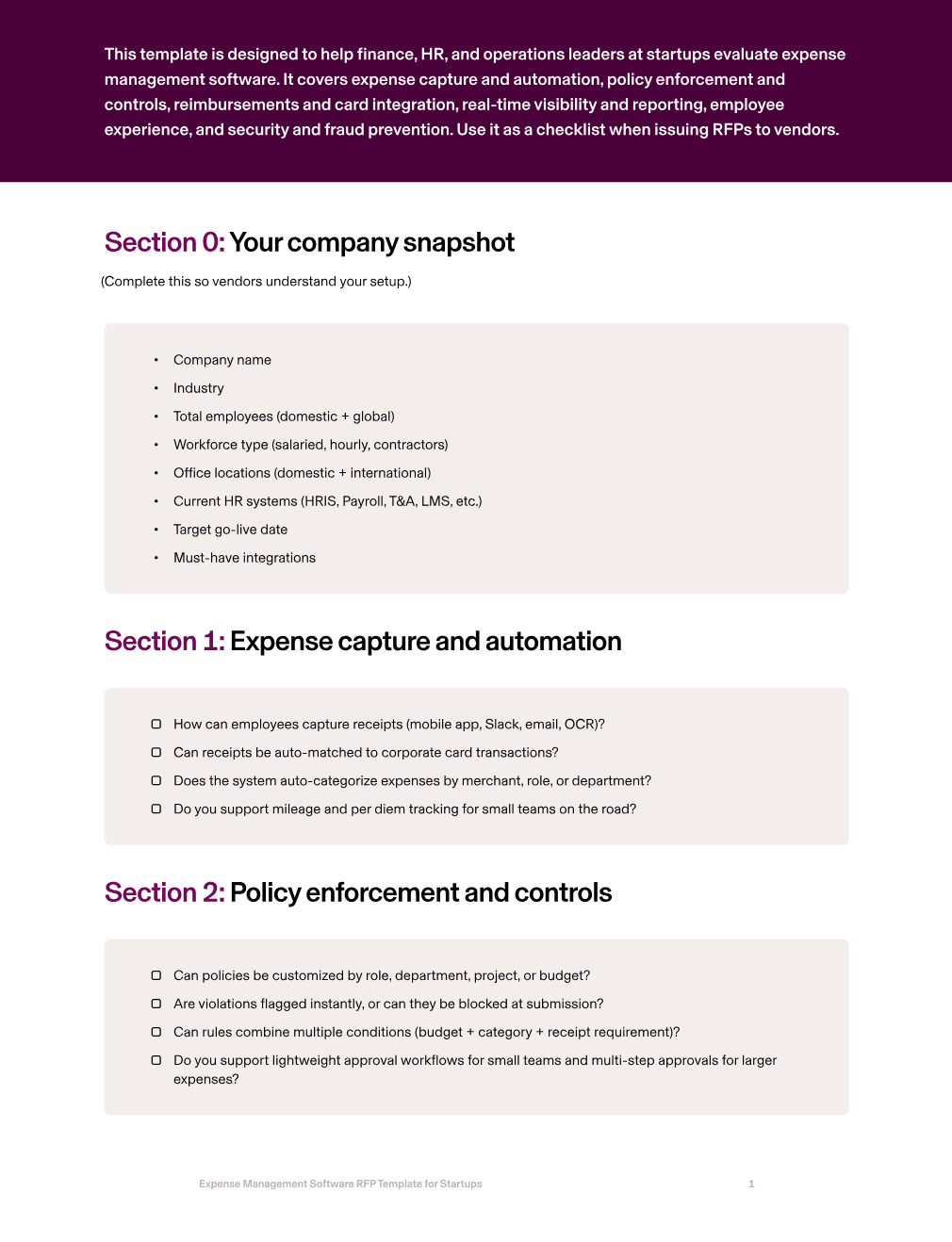
How can employees capture receipts (mobile app, Slack, email, OCR)?
Can receipts be auto-matched to corporate card transactions?
Does the system auto-categorize expenses by merchant, role, or department?
Do you support mileage and per diem tracking for small teams on the road?
2. Policy enforcement and controls
Small teams don’t have time to manually review every expense. The right platform enforces policies in real time, blocking or flagging out-of-policy spend before it hits the books. Policies should adapt automatically when someone switches roles, projects, or budgets.
Rippling Spend enforces expense rules directly from your financial systems and ERP data. When integrated with Rippling HR, policies can also adapt automatically based on employee role or department changes.
RFP questions to ask
Can policies be customized by role, department, project, or budget?
Are violations flagged instantly, or can they be blocked at submission?
Can rules combine multiple conditions (budget + category + receipt requirement)?
Do you support lightweight approval workflows for small teams and multi-step approvals for larger expenses?
3. Reimbursements and card integration
Disconnected tools create reconciliation headaches and slow reimbursements. Startups need one system where card transactions, out-of-pocket expenses, and payroll tie together automatically. Reimbursements should flow quickly — ideally hitting payroll or ACH without delays.
Rippling Spend integrates corporate cards and expense management with your accounting systems. When you add Rippling Payroll, reimbursements can be processed seamlessly through payroll runs.
RFP questions to ask
Do you offer native corporate cards that integrate directly with expenses?
How quickly are reimbursements processed via payroll or ACH?
Can expenses auto-code to QuickBooks, Xero, or NetSuite in real time?
Do you support split transactions or partial reimbursements?
4. Real-time visibility and reporting
Investors and founders need real-time insight into burn. A best-in-class system provides dashboards segmented by team, project, or vendor, with anomaly detection that flags unusual patterns. Data should export easily into spreadsheets or BI tools for board reporting.
Rippling Spend consolidates all spend — cards, reimbursements, and financial data — into one dashboard, giving startups real-time visibility into where every dollar is going.
RFP questions to ask
Do you provide real-time dashboards segmented by team, project, or vendor?
Can reports be segmented by department, manager, or location?
Do you support anomaly detection for unusual spend?
Can data be scheduled or exported to Google Sheets, Excel, or BI tools?
5. Employee experience
If submitting expenses is frustrating, employees delay or skip it — creating more work for finance and delaying reimbursements. The right solution should be mobile-first, simple, and built into daily workflows like Slack or email. Rippling Spend makes it easy for employees to submit receipts in seconds, track reimbursements in real time. When integrated with Rippling HR, employees can manage expenses alongside payroll and HR in one app.
RFP questions to ask
How easy is it for employees to submit expenses from mobile or Slack?
Can employees track reimbursements in real time?
Is there a self-service portal for employees to manage their expenses?
Do you integrate with Slack, Gmail, or Outlook for quick submission?
6. Security and fraud prevention
Even early-stage companies handle sensitive financial data, but they don’t have dedicated security teams. Expense management software should provide enterprise-grade protections: encryption, SOC 2/ISO certifications, and fraud detection that flags suspicious spend in real time.
Rippling encrypts all data in transit and at rest, enforces MFA for admins, and uses anomaly detection to alert finance leaders about risky transactions, giving startups security by default.
RFP questions to ask
What fraud detection and anomaly monitoring is included?
What certifications do you hold (SOC 2, ISO 27001, GDPR)?
Can admins freeze cards or block suspicious spend instantly?
How is expense data encrypted at rest and in transit?
How Rippling Spend helps startups
Rippling Spend Expense Management is built for lean finance teams that need automation, control, and visibility without adding headcount. Receipts are captured automatically, policies are enforced in real time, reimbursements flow through ACH or payroll (when integrated with Rippling Payroll), and every transaction syncs into QuickBooks or Xero. Founders and investors get real-time dashboards that show burn by team, project, or vendor, while employees enjoy a seamless, mobile-first experience that ensures expenses are submitted and reimbursements are fast.
With Rippling Spend, startups can:
Capture receipts instantly through Slack, email, or mobile
Enforce expense policies tied directly to HR data
Reimburse employees automatically via payroll or ACH
Integrate spend directly into QuickBooks or Xero
Get real-time dashboards for burn and spend reporting
Protect financial data with fraud detection and SOC 2/ISO-grade security
Rippling Spend works as a standalone expense management solution or integrates with Rippling HR and Payroll for even deeper automation. Startups can start with expense management alone and expand over time.
Rippling Spend RFP for expense management software for startups example
Section | Question to ask | Rippling Spend Answer |
|---|---|---|
Expense capture and automation | How can employees capture receipts (mobile app, Slack, email, OCR)? | Rippling Spend supports receipt capture via mobile app, Slack, email forwarding, and OCR scanning, so employees can submit instantly from anywhere. |
Can receipts be auto-matched to corporate card transactions? | Yes — Rippling Spend automatically matches receipts to Rippling Corporate Card transactions, eliminating manual reconciliation. | |
Does the system auto-categorize expenses by merchant, role, or department? | Yes — Rippling Spend auto-categorizes expenses based on merchant and HRIS-linked attributes like role, department, or project. | |
Do you support mileage and per diem tracking for small teams on the road? | Yes — Rippling Spend supports mileage and per diem submissions with automated policy enforcement. | |
Policy enforcement and controls | Can policies be customized by role, department, project, or budget? | Yes — Rippling Spend ties expense policies directly to HR data, allowing customization by role, department, location, or project. |
Are violations flagged instantly, or can they be blocked at submission? | Yes — Rippling Spend flags or blocks out-of-policy expenses at submission, enforcing compliance in real time. | |
Can rules combine multiple conditions (budget + category + receipt requirement)? | Yes — Rippling Spend supports layered policy conditions such as budget limits, category restrictions, and receipt requirements. | |
Do you support lightweight approval workflows for small teams and multi-step approvals for larger expenses? | Yes — Rippling Spend supports both lightweight and multi-step approval workflows, routed automatically by spend thresholds or org chart. | |
Reimbursements and card integration | Do you offer native corporate cards that integrate directly with expenses? | Yes — Rippling Spend Corporate Cards integrate natively with Expense Management, auto-matching transactions to receipts and policies. |
How quickly are reimbursements processed via payroll or ACH? | Reimbursements are processed automatically via payroll or ACH, with funds delivered on the next available cycle. | |
Can expenses be auto-coded to QuickBooks, Xero, or NetSuite in real time? | Yes — Rippling Spend auto-codes expenses to GL accounts in QuickBooks, Xero, or NetSuite in real time. | |
Do you support split transactions or partial reimbursements? | Yes — Rippling Spend supports split transactions and partial reimbursements, assigning each portion to the correct GL code or project. | |
How do you handle reimbursements for contractors and international team members? | Rippling Spend reimburses contractors and global team members via ACH or payroll, with multi-currency support where applicable. | |
Real-time visibility and reporting | Do you provide real-time dashboards segmented by team, project, or vendor? | Yes — Rippling Spend provides real-time dashboards that segment spend by team, project, vendor, or employee. |
Can reports be segmented by department, manager, or location? | Yes — Rippling Spend supports segmentation by department, manager, location, or cost center. | |
Do you support anomaly detection for unusual spend? | Yes — Rippling Spend flags unusual or duplicate spend with built-in anomaly detection. | |
Can data be scheduled or exported to Google Sheets, Excel, or BI tools? | Yes — Rippling Spend supports scheduled reporting and exports to Google Sheets, Excel, and BI tools. | |
Employee experience | How easy is it for employees to submit expenses from mobile or Slack? | Employees can snap a receipt in the mobile app, forward it via Slack or email, or upload it directly — no training required. |
Can employees track reimbursements in real time? | Yes — employees can view the status of reimbursements in Rippling Spend and track when they will hit payroll or ACH. | |
Is there a self-service portal for employees to manage their expenses? | Yes — Rippling Spend provides a unified self-service portal where employees can view and manage expenses alongside HR and payroll tasks. | |
Do you support integrations with Slack, Gmail, or Outlook for quick submission? | Yes — Rippling Spend integrates with Slack, Gmail, and Outlook so expenses can be submitted from daily workflows. | |
Security and fraud prevention | What fraud detection and anomaly monitoring is included? | Rippling Spend uses anomaly detection to flag duplicate or suspicious expenses in real time. |
What certifications do you hold (SOC 2, ISO 27001, GDPR)? | Rippling Spend is SOC 2 Type II certified, ISO 27001 certified, and GDPR compliant. | |
Can admins freeze cards or block suspicious spend instantly? | Yes — admins can freeze Rippling Spend Corporate Cards or block spend instantly from the dashboard. | |
How is expense data encrypted at rest and in transit? | All expense data is encrypted at rest and in transit with enterprise-grade standards. |
Ready to evaluate vendors?
Disclaimer

Author
The Rippling Team
Global HR, IT, and Finance know-how directly from the Rippling team.
Hubs
See Rippling in action
Increase savings, automate busy work, and make better decisions by managing HR, IT, and Finance in one place.