

























Rippling and its affiliates do not provide tax, accounting, or legal advice. This material has been prepared for informational purposes only, and is not intended to provide or be relied on for tax, accounting, or legal advice. You should consult your own tax, accounting, and legal advisors before engaging in any related activities or transactions.
Must-have IT management software RFP template for small businesses in 2025
In this article
For small businesses, IT is often handled by a lean team — or sometimes just one office manager or HR generalist wearing multiple hats. As headcount grows past 20 or 30 employees, ad hoc spreadsheets and manual device tracking create gaps: laptops go missing, terminated employees keep app access, and IT spends too much time on basic provisioning.
The right IT management platform for small businesses should make IT simple but secure.
It should unify identity, devices, and inventory in one system, automate onboarding and offboarding, and provide visibility into compliance risks like unpatched laptops or accounts without MFA. It also needs to integrate seamlessly with HR so every employee lifecycle event triggers the right IT workflows.
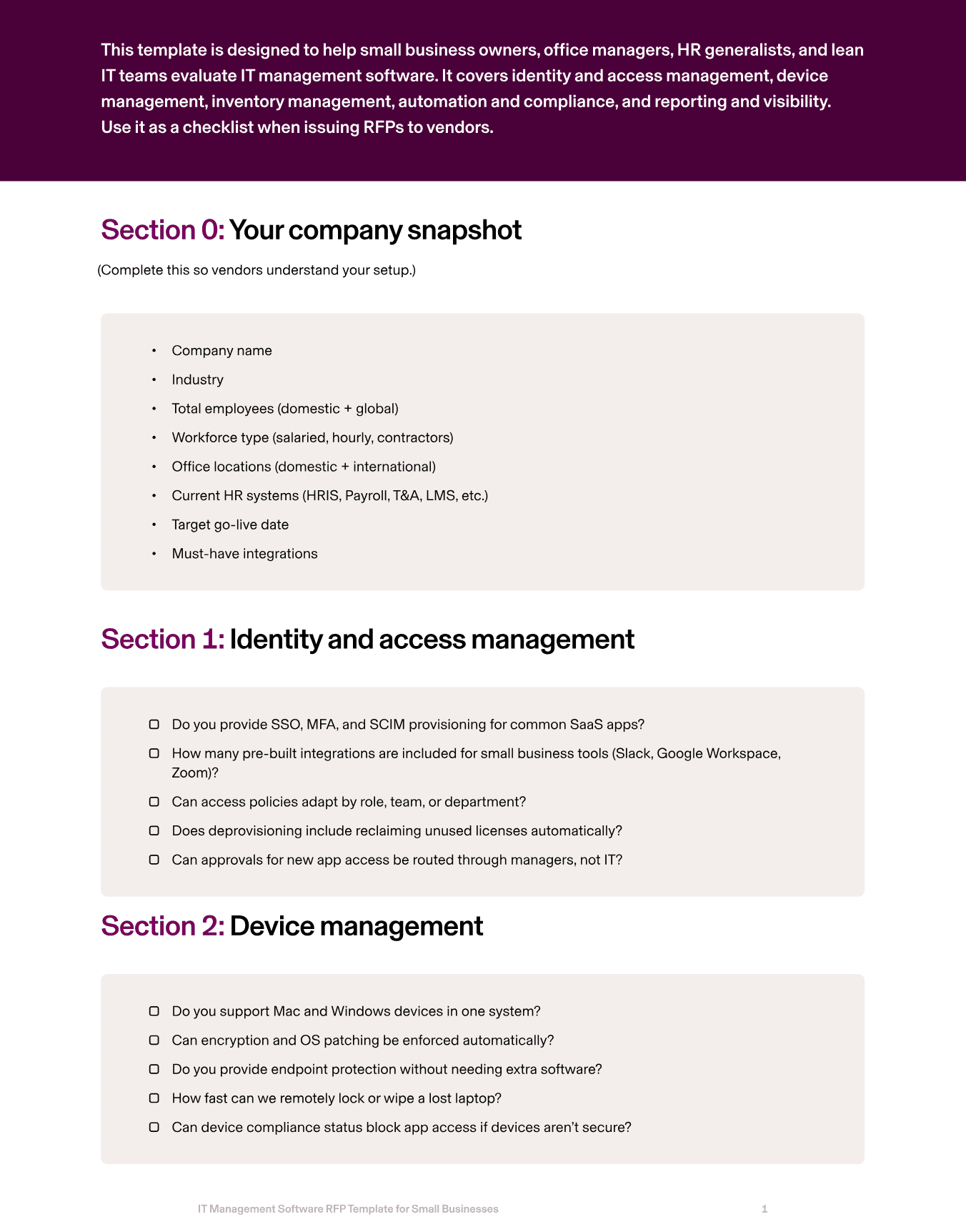
This guide shows the critical areas small businesses should evaluate in an IT management RFP, what best-in-class looks like, and the RFP questions to ask vendors. Plus, we’ll give you a downloadable guide so you can start evaluating IT management software ASAP.
1. Identity and access management
Small businesses can’t afford to manually set up accounts for every app. Without automation, onboarding is slow and ex-employees often retain access to critical systems. A strong IT platform should provide SSO, MFA, and automated provisioning/deprovisioning tied to employee records.
Rippling IT automates provisioning for 800+ apps, enforces MFA, and revokes access instantly during offboarding.
RFP questions to ask
Do you provide SSO, MFA, and SCIM provisioning for common SaaS apps?
How many pre-built integrations are included for small business tools (Slack, Google Workspace, Zoom)?
Can access policies adapt by role, team, or department?
Does deprovisioning include reclaiming unused licenses automatically?
Can approvals for new app access be routed through managers, not IT?
2. Device management
Every lost or unsecured laptop is a liability for small businesses, so device management is critical. IT management software should enforce encryption and patching automatically, provide visibility into device compliance, and enable remote wipe.
Rippling IT's MDM manages Mac, Windows, iOS, and iPadOS devices in one place, ensuring small teams can meet security requirements without manual effort.
RFP questions to ask
Do you support Mac and Windows devices in one system?
Can encryption and OS patching be enforced automatically?
Do you provide endpoint protection without needing extra software?
How fast can we remotely lock or wipe a lost laptop?
Can device compliance status block app access if devices aren’t secure?
3. Inventory management
Small businesses often have no dedicated asset manager, so visibility is critical.
An IT system should tie every device to an employee, automate shipping and returns, and provide real-time dashboards for finance and IT.
Rippling IT’s inventory management software links devices directly to employee records, ships laptops globally from warehouses, and tracks compliance status in one dashboard.
RFP questions to ask
Can we purchase, store, and ship devices directly through your platform?
Do you provide global warehouses for direct-to-employee shipping?
Are return kits automatically sent when an employee leaves?
Do you track compliance details (encryption, OS version) in the inventory system?
Can inventory data be exported for audits or finance reporting?
4. Automation and compliance
With lean IT staff, small businesses need automation to eliminate manual onboarding and offboarding. IT workflows should automatically provision apps, ship laptops, and revoke access when employees leave.
Rippling IT automates lifecycle workflows triggered by HR events, surfaces compliance risks like unencrypted devices, and generates audit-ready logs for SOC 2 and ISO reporting.
RFP questions to ask
Do workflows trigger automatically when employees are hired, promoted, or terminated?
Can small businesses customize onboarding/offboarding workflows without coding?
Do you provide alerts for compliance issues like unpatched laptops or missing MFA?
Are all IT changes logged immutably for audits?
What security certifications do you hold (SOC 2, ISO 27001)?
5. Reporting and visibility
Small business leaders need easy access to IT metrics without relying on a dedicated IT analyst. The HR/ops lead should be able to pull reports on device compliance, app access, or inventory in minutes.
Rippling IT provides real-time dashboards, prebuilt reports, and export options that anyone can use, no technical expertise required.
RFP questions to ask
What standard reports are included (device compliance, app usage, inventory status)?
Can non-technical staff create and schedule reports?
Do you support report segmentation by team, manager, or location?
Can data be exported to CSV, Excel, or BI tools?
How do you enforce row-level security in shared reports?
How Rippling helps small businesses
Rippling IT makes enterprise-grade IT management simple for small teams.
With Rippling IT, every employee event in HR triggers the right IT workflows when integrated with either Rippling’s all-in-one workforce solution or third-party HR solutions.
When this happens and you connect Rippling IT to up-to-date employee data, accounts are provisioned on day one, laptops ship pre-configured to the employee, and when they leave, access is revoked instantly and return kits are dispatched automatically.
Small businesses benefit from automation that reduces manual IT work: MFA and encryption are enforced across all devices, compliance risks are flagged in real time, and immutable logs are generated for audits.
Finance teams gain visibility into IT spend and inventory, while HR/ops staff get an easy way to manage IT without needing technical expertise.
Rippling IT also helps small businesses reduce costs by consolidating multiple IT tools into one platform.
Instead of separate providers for SSO, device management, and inventory tracking, Rippling IT unifies everything into a single system built around employee record data.
When you add the IT module onto Rippling’s all-in-one solution, employees also get a seamless experience too — logging in once to access every app securely, while IT and HR get full visibility into compliance.
With Rippling IT, small businesses can:
Automate onboarding and offboarding end-to-end with HR-triggered workflows
Enforce MFA, encryption, and patching policies without extra software
Track inventory in real time with devices tied to employee records
Provide self-service reporting and dashboards for non-technical staff
Reduce vendor costs by unifying identity, devices, and inventory in one system
Rippling RFP for IT management software for small businesses example
Section | Question to ask | Rippling Answer |
|---|---|---|
Identity and access management | Do you provide SSO, MFA, and SCIM provisioning for common SaaS apps? | Yes — Rippling IT provides SSO, MFA enforcement, and SCIM provisioning across 800+ SaaS applications. |
How many pre-built integrations are included for small business tools (Slack, Google Workspace, Zoom)? | Rippling IT offers 800+ pre-built integrations, including popular small business tools like Slack, Google Workspace, Zoom, and more. | |
Can access policies adapt by role, team, or department? | Yes — Rippling IT ties access policies directly to HR attributes such as role, department, or team. | |
Does deprovisioning include reclaiming unused licenses automatically? | Yes — Rippling IT automatically reclaims licenses and transfers file ownership during deprovisioning. | |
Can approvals for new app access be routed through managers, not IT? | Yes — Rippling IT enables manager-driven access requests and approvals through configurable workflows. | |
Device management | Do you support Mac and Windows devices in one system? | Yes — Rippling IT supports and manages macOS and Windows devices in a unified platform. |
Can encryption and OS patching be enforced automatically? | Yes — Rippling IT enforces encryption and OS patching policies automatically across devices. | |
Do you provide endpoint protection without needing extra software? | Yes — Rippling IT provides built-in endpoint protection without requiring third-party software. | |
How fast can we remotely lock or wipe a lost laptop? | Devices can be locked or wiped remotely within seconds through Rippling IT’s console. | |
Can device compliance status block app access if devices aren’t secure? | Yes — Rippling IT ties device compliance to app access, blocking logins if devices don’t meet security requirements. | |
Inventory management | Can we purchase, store, and ship devices directly through your platform? | Yes — Rippling IT offers a Device Store and warehouse network where businesses can purchase, store, and ship devices globally. |
Do you provide global warehouses for direct-to-employee shipping? | Yes — Rippling IT operates warehouses globally and supports direct-to-employee shipping. | |
Are return kits automatically sent when an employee leaves? | Yes — Rippling IT automatically generates and ships return kits when employees offboard. | |
Do you track compliance details (encryption, OS version) in the inventory system? | Yes — Rippling IT tracks real-time device compliance including encryption status, OS version, and patch level. | |
Can inventory data be exported for audits or finance reporting? | Yes — Rippling IT inventory data can be exported for finance teams and compliance audits. | |
Automation and compliance | Do workflows trigger automatically when employees are hired, promoted, or terminated? | Yes — Rippling IT automates IT workflows based on HR lifecycle events. |
Can small businesses customize onboarding/offboarding workflows without coding? | Yes — Rippling IT includes a no-code workflow builder to customize onboarding and offboarding. | |
Do you provide alerts for compliance issues like unpatched laptops or missing MFA? | Yes — Rippling IT surfaces compliance alerts in real time for issues like missing MFA or unpatched devices. | |
Are all IT changes logged immutably for audits? | Yes — Rippling IT generates immutable logs for all IT actions, exportable for audits. | |
What security certifications do you hold (SOC 2, ISO 27001)? | Rippling IT is SOC 2 Type II certified and ISO 27001 certified. | |
Reporting and visibility | What standard reports are included (device compliance, app usage, inventory status)? | Rippling IT includes reports for device compliance, app usage, access logs, and inventory. |
Can non-technical staff create and schedule reports? | Yes — Rippling IT offers a no-code reporting builder so non-technical staff can create and schedule reports. | |
Do you support report segmentation by team, manager, or location? | Yes — Rippling IT reports can be segmented by team, department, manager, or location. | |
Can data be exported to CSV, Excel, or BI tools? | Yes — Rippling IT supports exporting reports to CSV, Excel, Google Sheets, and BI platforms. | |
How do you enforce row-level security in shared reports? | Yes — Rippling IT enforces role-based permissions and row-level security for shared or exported reports. |
Ready to evaluate vendors?
Disclaimer

Author

Michael Hendricks
Head of IT Content
Michael Hendricks is an award-winning writer and editor with over a decade of experience shaping compelling narratives across newsrooms, non-profits, and digital media organizations. With a background that bridges journalism and strategic communications, he brings a keen editorial eye and a sharp understanding of how to translate complex information into stories that connect. Michael currently leads content for Rippling IT, where he manages editorial strategy and content. Previously, he’s worked with outlets such as CNN and Search Party, where he produced and edited stories ranging from geopolitics and public policy to global markets and the business of sports with nuance and care.
Hubs
See Rippling in action
Increase savings, automate busy work, and make better decisions by managing HR, IT, and Finance in one place.