10/10 verdict
Rippling Payroll is a powerful yet straightforward payroll system that brings your HR, time tracking, and benefits into one automated pay cycle.
Whether you're managing a workforce of five or 5,000 people, Rippling makes sure your payroll is always accurate and compliant. It automates 95% of payroll admin and offers deep customization options that reduce manual data entry. And if you’re tired of juggling multiple disconnected systems for HR, IT, and finance, Rippling consolidates everything.
Rippling's key features include:
Automated payroll processing: Process payroll (in minutes) with a single click, calculating wages, taxes, and deductions automatically.
Automated tax calculation and filing: Rippling handles federal, state, and local tax calculations, filing, and remittance, and will reimburse any penalties or interest you incur due to Rippling errors.
Unified multi-state and global payroll: Pay workers in 50+ U.S. states, over 185 countries, and 50+ currencies in one workflow.
Unlimited off-cycle runs: Unlimited payroll runs with bonuses and corrections, without worrying about extra fees.
Unified platform integration: Rippling connects payroll with its native HRIS, Time & Attendance, and Benefits modules, so changes like promotions or benefit adjustments update automatically.
Advanced reporting and analytics: Track live payroll performance with customizable reports and automated journal entries to accounting systems like QuickBooks and NetSuite.
Compliance and risk management: Rippling applies jurisdiction-specific wage, overtime, and leave rules automatically, with immutable audit logs for each payroll action.
Customization and workflows: Build custom workflows and create pay codes for anything from stipends to commissions, all through Rippling's Workflow Studio.
Employee self-service: Let your team access their pay stubs and update personal details with ease via a user-friendly web portal or mobile app.
|
Combines HR, IT, Finance, and Payroll into one error-free system. | Base rates are listed, but you'll need a custom quote for exact pricing. |
Offers a 100% accuracy guarantee for tax filings and indemnifies you against penalties caused by system errors. | While live support is available, only administrators (not individual employees) can contact Rippling's customer support team directly. |
Supports unlimited off-cycle runs at no cost, custom pay types, multi-level approvals, and visual workflow automation. | Configuring highly customized workflows or complex, multi-module implementations (HR, IT, Finance) requires some familiarity with the platform. However, support is available. |
Manages both domestic and international payroll (185+ countries) in one natively built platform. | The payroll module is an add-on to the core Rippling platform and cannot be purchased independently. |
“Rippling is more intuitive and easier to use than other payroll providers I’ve used, like ADP. I also appreciate their thoughtful touches that improve the employee experience, including providing digital copies of W-2s inside the Rippling portal, making them much easier to keep track of and easier for employees to access.
Scott Kaufmann
Managing Partner at Highnoon
Rippling Payroll pricing
Rippling uses a modular pricing model, meaning payroll is an add-on to its core Human Resource Information System (HRIS) platform, the single source of truth for all employee data. This pricing model lets you pay for only what you need. For example, you can start with employee management, then add payroll, benefits, or IT tools as you grow.
Rippling’s core platform pricing starts at $8 per employee per month, and Payroll at $35 per month per user.
Here's how Rippling stacks up against the competition:
|
| Gusto | Gusto is designed for small to mid-sized businesses. Pricing starts at $49 + $6 per employee per month. | Gusto is known for being user-friendly, but reportedly has limited payroll capabilities outside of contractor payments and EOR, which it offers through Remote.com.
Rippling offers a unified platform for multi-country payroll and integrates all HR, IT, and Finance data natively, which Gusto does not. |
| ADP | ADP offers scalability across businesses of all sizes, with a wide range of HR and financial tools. Pricing is quote-based. | ADP has a lower rating for ease of setup (7.6/10) compared to Rippling (9.3/10). |
| QuickBooks Payroll | QuickBooks' payroll module is an extension of their accounting platform. Pricing starts at $44 + $6.50 per employee per month. | QuickBooks Payroll lacks an in-house HRIS, meaning it cannot consolidate HR and payroll into one single source of truth like Rippling does. |
| Paycom | Paycom offers payroll and compliance to mid-market and enterprise employers. Pricing is quote-based. | Paycom doesn't integrate with third-party systems. Rippling has 650+ bi-directional integrations.
Rippling’s interface is also simpler, with native automation that eliminates repetitive admin work. |
Ease of Rippling Payroll use and interface
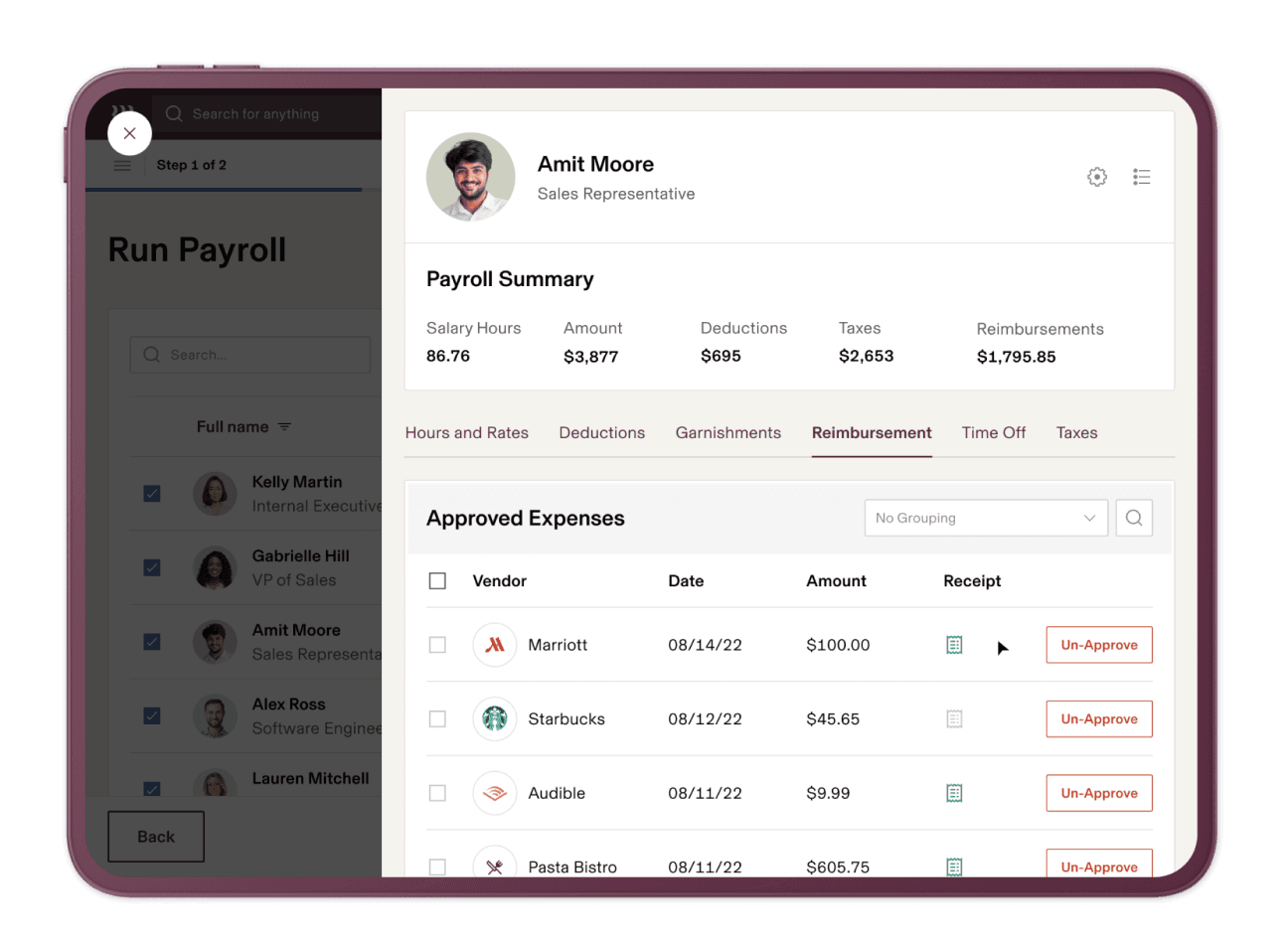
Despite its vast array of tools and features, I find that Rippling makes complex payroll tasks feel surprisingly simple. The administrative dashboard is clean, visual, and easy to navigate, even if you’re managing hundreds of employees across different pay schedules.
From one screen, you can review hours worked, approve time off, preview deductions, and run payroll. And once your workers are onboarded, most pay runs can be completed in 90 seconds or less.
Your employees aren't left out of this smooth experience. They can view pay stubs, request time off, clock in/out, access W-2s or 1099s, and update direct deposit settings through a self-service portal. The mobile version supports most day-to-day needs, though detailed reporting still works best on a desktop.
“The impact has been profound. Employees are now actively using the platform through the mobile app, accessing benefits, time-off information, and more. We even upgraded our tier just so we could get more functionality.
Adriana Headley
Director of Administrative Services at B2Lead
Rippling’s biggest strength is how it syncs payroll with every other part of your employee lifecycle (onboarding, relocations, or terminations). This means you don’t have to chase down data from HR or time tracking apps—Rippling already has it.
For example, when an employee gets promoted or updates their benefits, the system automatically adjusts their salary and deductions before the next pay cycle.
You can also run unlimited off-cycle pay runs (bonuses, corrections, or terminations) at no extra cost. If an employee misses a commission, just enter the correct amount, and Rippling automatically recalculates net pay and taxes with a clear audit trail. Stipends and wage garnishments are also supported.
While Rippling’s payroll platform is powerful, there’s a short learning curve up front. However, once it’s set up, it drives downstream compliance and pays off long-term with faster, more accurate payroll cycles. You only have to do it once.
Core Rippling Payroll functionalities
Rippling Payroll goes beyond simple paycheck processing. Here are the core areas where it really shines.
1. Automated payroll processing
Once your pay schedule is set, payroll runs automatically after syncing hours, wages, deductions, and reimbursements. When you hire or promote an employee, the system automatically prorates their pay.
You can also preview pay runs, flag discrepancies, and automate approval workflows.
Rippling supports both direct deposit and paper checks, and because it updates instantly, you always see accurate totals before finalizing.
2. Tax filing and compliance
Rippling automatically calculates, files, and remits federal, state, and local payroll taxes for every pay run. It manages W-2s, 1099s, and new hire reporting, without requiring external tools.
Rippling also ensures multi-state compliance. When an employee relocates, Rippling instantly updates and applies the new state-specific rules and tax requirements to their payroll record.
Year-end reporting is fully automated, and you get alerts if something looks off before filings are submitted.
“With employees scattered across the US, ensuring compliance with a patchwork of state and federal regulations was like trying to sail across the ocean in a teacup. Manual processes left us vulnerable to compliance gaps, putting the company at risk of penalties and even reputational harm. Enter Rippling, the Captain of the cruise ship of compliance, coming to scoop us out of our teacup and into a sturdy vessel.
Christine Moore
HR Specialist at DeepNet Proactive IT Support
3. Benefits and deductions sync
Rippling natively connects payroll with its benefits administration module to ensure that deductions for insurance, 401(k), FSA, or commuter plans always reflect current elections.
When an employee’s benefits change mid-year, the deduction amounts update automatically in payroll. If you missed a deduction in a prior period, Rippling automatically calculates the exact tax liability adjustments for both the employee and your company, based on the corrected gross amount.
Because everything runs off a single employee record, benefits, payroll, and finance always align. This way, you don't have to worry about keeping deductions accurate after promotions, policy updates, or life events.
4. Global Payroll capabilities
Rippling’s Global Payroll module is a major advantage if you have international employees or contractors. You can combine U.S. and global payroll under one roof with no need for separate systems or third-party providers.
Rippling also supports Employer of Record (EOR) setups and global tax compliance if you're hiring overseas without a local entity. You can pay workers in 185+ countries and 50+ currencies within a single workflow.
For example, if you're a US-based company that's expanding into Canada and the UK, you can manage all entities, each with its own pay rules, approvals, and reporting, directly through Rippling without leaving the platform.
“When I was first introduced to Rippling, I was in the process of merging 8 separate EINs into a single entity. I was worried that trying to convert the data from multiple payroll companies was going to be a challenge, but the integration team at Rippling was amazing. I had support through the entire process and once it was implemented my team loved how easy everything was to navigate.
Bonnie Thompson
COO at Forest Family Dentistry
5. Time tracking and labor costing
Once your employees clock in and you approve timesheets, that information is ready for payroll. You don't need any third-party imports. Rippling Time & Attendance, another native integration, powers this connection.
You also track labor costs by project, department, or job code, and calculate premiums, shift differentials, and compliance rules. Hours worked, overtime, and PTO data sync automatically.
Rippling also flags errors such as duplicate entries or missing timecards before processing payroll. You can also compare pay runs against past runs to catch discrepancies.
Compared to manual or third-party time tracking systems, Rippling’s native setup cuts down payroll errors and gives you real-time visibility into wage costs before payroll even runs.
And since we're talking about time, Rippling saves senior managers up to 22 hours annually.
“We use Rippling for Time and Attendance, which makes it easy to track and report the hours of our hourly employees to enable product and project profitability analysis. The flexibility of Rippling’s reporting tools is hugely valuable for our business units, who rely on this data for project management.
Maksim Gekhman
Director of Finance, CPA at Andros
Rippling Payroll reporting and analytics
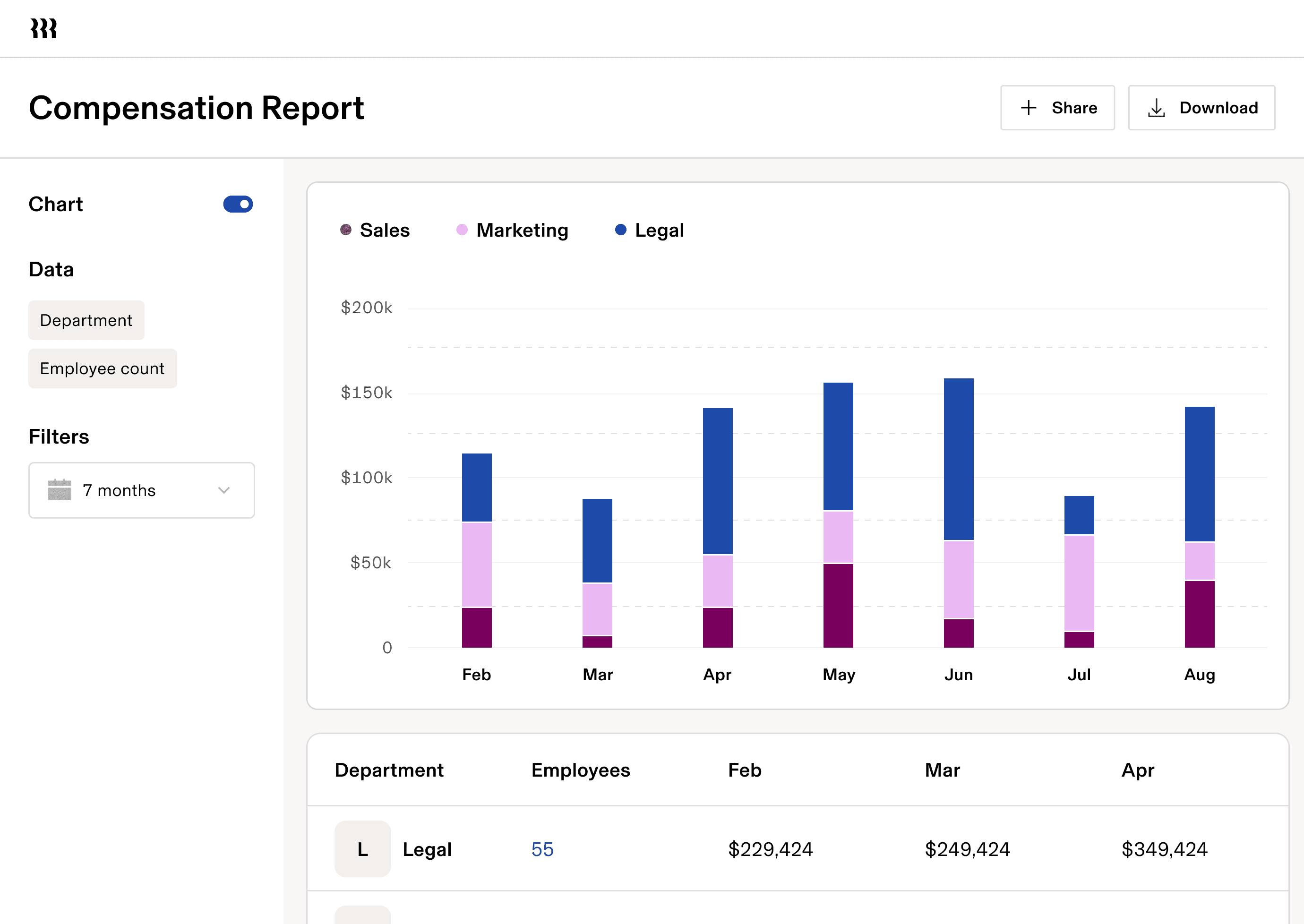
Rippling’s reporting engine is one of the most powerful parts of its payroll suite. Out of the box, you get a library of hundreds of pre-built reports for earnings, taxes, time tracking, and benefits.
You can see an overhead view of labor costs across your company or visualize individual trends like total payroll spend, overtime, bonuses, tax liabilities, or total compensation by department, location, or job type.
For more granular insights, Rippling’s custom report builder lets you slice data using no-code filters and formulas.
You can export these reports to CSV, PDF, or via API, and even automate journal entries to your accounting or ERP systems (QuickBooks, Xero, NetSuite) for forecasting and audits.
Also, Rippling keeps all your tax documents and past payroll records permanently on file. You can pull them up anytime for audits, making mandatory compliance far less stressful.
Rippling Payroll integrations and automations
The real magic happens in Workflow Studio, Rippling’s no-code automation engine. You can choose from pre-built workflows (or Recipes) or build your own from scratch.
For example:
|
New hire onboarding | When a new hire joins, automatically add them to payroll, enroll them in benefits, provision their equipment, and grant access to specific applications. |
Pay run completion | When a pay run completes, send a finance summary to Slack and update your general ledger instantly. |
Exchange rate fluctuation (for global payroll) | When currency rates shift beyond a defined threshold, trigger a notification for Finance to review upcoming international payments. |
Overtime crosses threshold | Send a Slack alert to the manager and automatically tag the employee for inclusion in the next payroll audit report. |
To power the workflows, Rippling integrates directly with 650+ different apps like QuickBooks, NetSuite, Slack, and Google Workspace, so every trigger can take real action across your tech stack.
With this, alerts go out and exceptions get handled, all based on how your team actually works.
|
Automation scope | End-to-end automation across HR, Finance, and IT. | Primarily HR and payroll workflows. |
Custom triggers and conditional logic | Trigger actions from any event (e.g., promotion, department change, new device setup) inside Rippling and third-party apps. | Basic rule-based triggers for payroll or onboarding. |
Cross-app integration | Deep bi-directional integrations with hundreds of tools (Slack, Gusto, Jira, QuickBooks, Okta, etc.). | Limited integrations, mostly accounting and HR apps. |
“We really love the automation components. When you're adding 50, 60, 100 employees at a time, you need automation to do that efficiently. Being able to build workflows and automate as much of the onboarding and hiring process as possible was a key part of the future for us.
Dan Krzmarzick
Co-founder and CFO at Revology
Rippling Payroll security and compliance
Rippling holds SOC 2 Type II and ISO 27001 certifications, aligns with GDPR standards, and uses 256-bit AES encryption for data in transit and at rest.
Sensitive payroll data access is secured with multi-factor authentication (MFA), single-sign-on (SSO), and role-based access controls that dynamically adjust as employee roles change.
You can also build custom workflows that take pre-determined security actions when triggered.
“By automating the technology management side, Rippling has saved us 50% more time compared to what we used at my previous agency. I love that we can provision devices with cascading permissions based on role, in addition to things like device ID tracking and managing SSO for all our different apps.
Scott Kaumann
Managing Partner at High Noon
Rippling Payroll customer support & implementation
Getting started with Rippling is a guided process. You’ll answer a few setup questions about your company, like your headcount, industry, and what tasks you want the platform to manage, so automations can take over. A dedicated implementation team is also available to assist with data migration, workflow configuration, and parallel testing periods to validate accuracy before going live.
“We are a non-profit organization and far from Rippling's largest customer, but they treat us like we are their top priority.
Suzie Martin
Executive Director at Gateway Church
Once it’s running, onboarding employees is easy. Rippling has a self-help knowledge base with short video tutorials, webinars, API documentation, and step-by-step guides that make it easy for anyone to get comfortable with the platform quickly. And if you need hands-on assistance, there's email and live-chat support, with public support stats.
Setting up Rippling workflows can take time, especially if you’re using multiple modules like HR and IT, but that configuration pays off. Once built, those custom approval chains and compliance rules automate most admin work.
“For me, the service component is just as important as the software component. With Rippling, I get responses in minutes, whereas the same questions could take other providers a week to solve. Every person that I’ve worked with at Rippling has a real sense of empathy for our employees who are using their product daily—they want to create the best experience possible. It feels like Rippling is a partner for me in shaping that experience, not just a software provider.
Kristen Hayward
Head of People & Ops at Superhuman
Rippling Payroll customer reviews & ratings
Rippling Payroll holds a 4.8/5 rating from more than 10,000 reviews on G2, is rated as the #1 Payroll on Capterra with 4.9/5 stars, and scores 8.9/10 on TrustRadius. Rippling is also a regional payroll leader on G2 for the Americas, Asia-Pacific, and EMEA.
Many users echo similar praise for its unified data model, ease of use, and time-saving automations, especially for managing payroll across multiple locations. The criticisms I found focused on pricing transparency and limited employee access to support, though most agree the platform’s power outweighs these minor drawbacks.
Here are a few standout comments I gathered:
“Rippling is a solid payroll company. No major complaints, it serves our needs and has lots of options available. You pay for what you need and don't pay for what you don't, and it has support for multiple companies/EINs on one account.
— Comptroller, Research*
“Rippling has been an incredibly useful solution for our organization. After coming from other companies that had alternatives that were far inferior, as an end-user, Rippling has been a pleasant surprise. I find it incredibly intuitive. The activities that I need to complete are where they "should" be. No extensive training has been necessary.
On top of that, Rippling makes it easy. For example, actions you need to take appear as notifications. Those notifications link you directly to where you need to take action. No need to hunt through several clicks on several pages. Everything seems like it is a couple of clicks away.”
— VP of Sales at a 500+ FTEs company
“The built-in AI feature is my smart personal assistant that helps me do my job. There’s also behind-the-scenes support Rippling provides that’s far superior to anything I’ve experienced before. I found myself saving 30-50% of my time spent on administrative tasks.”
— Tatyana Veremyova, Director of Employment Compliance at Y Combinator
*All quotes are from verified Capterra reviews.
Rippling payroll vs competitors
Here’s how Rippling compares to Gusto, ADP, QuickBooks Payroll, and Paycor:
|
Automated tax filing | ✅ Yes | ✅ Yes | ✅ Yes | ⚪ Partial | ✅ Yes |
Multi-state compliance | ✅ Built-in | ⚪ Limited | ✅ Yes | ⚪ Limited | ✅ Yes |
Benefits sync | ✅ Seamless | ⚪ Partial | ⚪ Partial | ❌ No | ⚪ Partial |
Global payroll | ✅ Available | ❌ No | ✅ Yes | ❌ No | ⚪ Limited |
IT integration | ✅ Unique | ❌ No | ❌ No | ❌ No | ⚪ Limited |
Rippling stands out for companies with distributed teams or global scaling needs. While competitors like Gusto or QuickBooks Payroll work for smaller, single-state businesses, they can’t match Rippling’s global coverage or its deep cross-module automation.
Final verdict: Rippling Payroll is 10/10
Payroll is the lifeblood of your company, but every error—whether a missed bonus, retro pay, or clerical mistake—can be stressful and risky.
Rippling Payroll changes that.
It’s a must-use if you want payroll to happen accurately, compliantly, and without endless admin work. Whether you’re managing a hybrid team across multiple states or paying contractors globally, Rippling makes it seamless. Even better, payroll can be completed in as little as 90 seconds, making it one of the fastest systems on the market.
Yes, pricing requires a custom quote, and workflow setup does take some upfront effort, but if you're a fast-growing business that values automation and time savings, Rippling is one of the most reliable payroll systems you can buy.
FAQs about Rippling Payroll
How much does Rippling Payroll cost?
Rippling is based on a modular pricing model where Payroll is an add-on to the core Rippling HRIS platform. Core HRIS starts at $8 per employee per month, and Domestic Payroll starts at $8 per employee per month.
Does Rippling handle multi-state or global payroll?
Yes. Rippling supports full multi-state compliance for U.S. businesses and global payroll, including contractor payments in over 185+ countries. It automatically applies the correct local tax codes and exchange rates, ensuring compliance no matter where your employees work.
Can I use Rippling Payroll without Rippling HRIS?
No. Payroll is built as part of the Rippling ecosystem, which ensures all employee data syncs automatically.
How does Rippling compare to Gusto or ADP?
Compared to Gusto or ADP, Rippling offers deeper automation and broader integration (650+ apps). It doesn't rely on third-party services or acquisitions for full functionality.
Your business is complex.
Payroll software shouldn’t be.
Disclaimer
Rippling and its affiliates do not provide tax, accounting, or legal advice. This material has been prepared for informational purposes only, and is not intended to provide or be relied on for tax, accounting, or legal advice. You should consult your own tax, accounting, and legal advisors before engaging in any related activities or transactions.